
Trial Interactive Rooms
This section explains TI Rooms in MYTI.
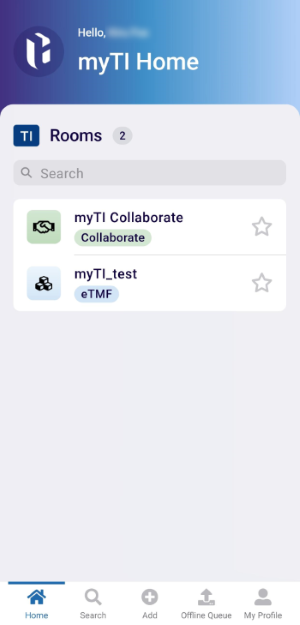
The Trial Interactive Rooms section provides an overview of the different TI Rooms available to users through myTI. TI Rooms act as centralized workspaces that give users streamlined access to different Trial Interactive modules and study-specific content based on their role and permissions.
When users log in to myTI, the home page displays all the TI Rooms they have access to. From here, users can quickly navigate to different rooms to perform tasks, review content.
The following room types are typically available:
-
eTMF Room – Provides access to the electronic Trial Master File, which opens the Site tab by default and displays all the sites linked to the room. Users can navigate to the Sites, Docs, To-dos, and More tabs to access and perform the relevant information and actions, respectively.
-
Collaborate Room – When users access the Collaborate Room, they are presented with a tabbed interface that allows them to manage collaboration activities efficiently. The primary tabs include Sites, Docs, To-dos, and More, each supporting a specific set of actions:

TransPerfect’s Trial Interactive is an industry leader in practical, global eClinical innovation
PRODUCTS
 Linkedin
 X
X
Didn’t find what you need?
Our dedicated Project Management and Client Services team will be available to meet your needs
24 hours a day, 7 days a week.
Toll Free:
(888) 391-5111
help@trialinteractive.com
© 2025 Trial Interactive. All Rights Reserved

