
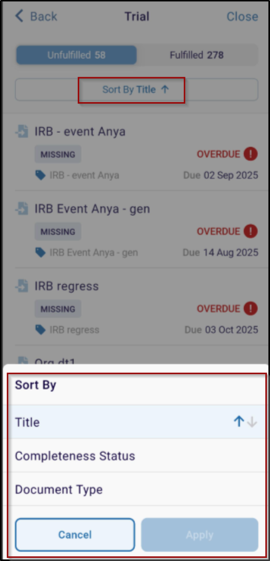
Sort by Title
The eTMF Health Dashboard allows users to sort documents alphabetically by Title, making it easier to locate specific records within large studies. This feature helps streamline document review and ensures quick access to required files.
Steps to Sort by Title
- In the eTMF Health Dashboard, click on the below options (e.g., Trial, Country.).
- User can see Unfulfilled and Fulfilled option, under that Sort by Title option.
- From the list, select Title.
- Tap Apply to organize documents alphabetically.
- Use the arrow indicator next to Title to toggle between ascending and
descending order.

TransPerfect’s Trial Interactive is an industry leader in practical, global eClinical innovation
PRODUCTS
 Linkedin
 X
X
Didn’t find what you need?
Our dedicated Project Management and Client Services team will be available to meet your needs
24 hours a day, 7 days a week.
Toll Free:
(888) 391-5111
help@trialinteractive.com
© 2025 Trial Interactive. All Rights Reserved

