
Cross-Room Search
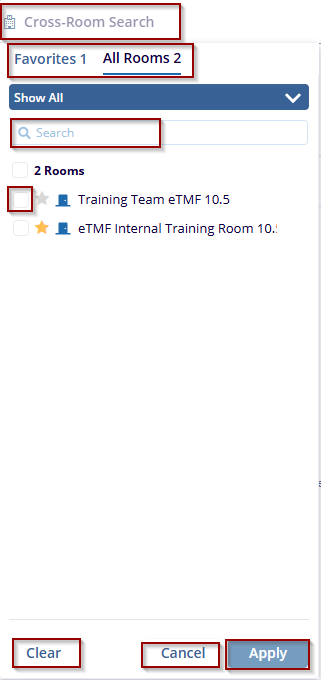
The Cross-Room Search feature in Trial Interactive enables users to perform searches across multiple rooms simultaneously. Users can easily toggle between two tabs: Favorites and All Rooms. The Favorites tab allows quick access to frequently used rooms, while the All-Rooms tab provides a complete list of available rooms for selection.
To perform a cross-room search, follow the steps below:
- Click on the Cross-Room Search option in the search interface.
- Use the tabs at the top to switch between
-
- Favorites: Displays frequently used rooms.
- All Rooms: Shows a complete list of available rooms.
-
- Enter the room name or keyword in the search bar to quickly find specific rooms.
- Check the boxes next to the desired rooms to include them in the search.
- Click the Apply button to start the search across the selected rooms.
- Click Clear to remove all selected rooms.
- Click Cancel to close the Cross-Room Search without applying any changes.
Refer to the screenshot below:

 Linkedin
 X
X

