
Mass Coding
The Mass Coding allows the user to apply metadata to multiple documents at the same time. A room can be configured to allow both Causality Tracking and Mass Coding.
Steps to apply mass coding, follow these steps:
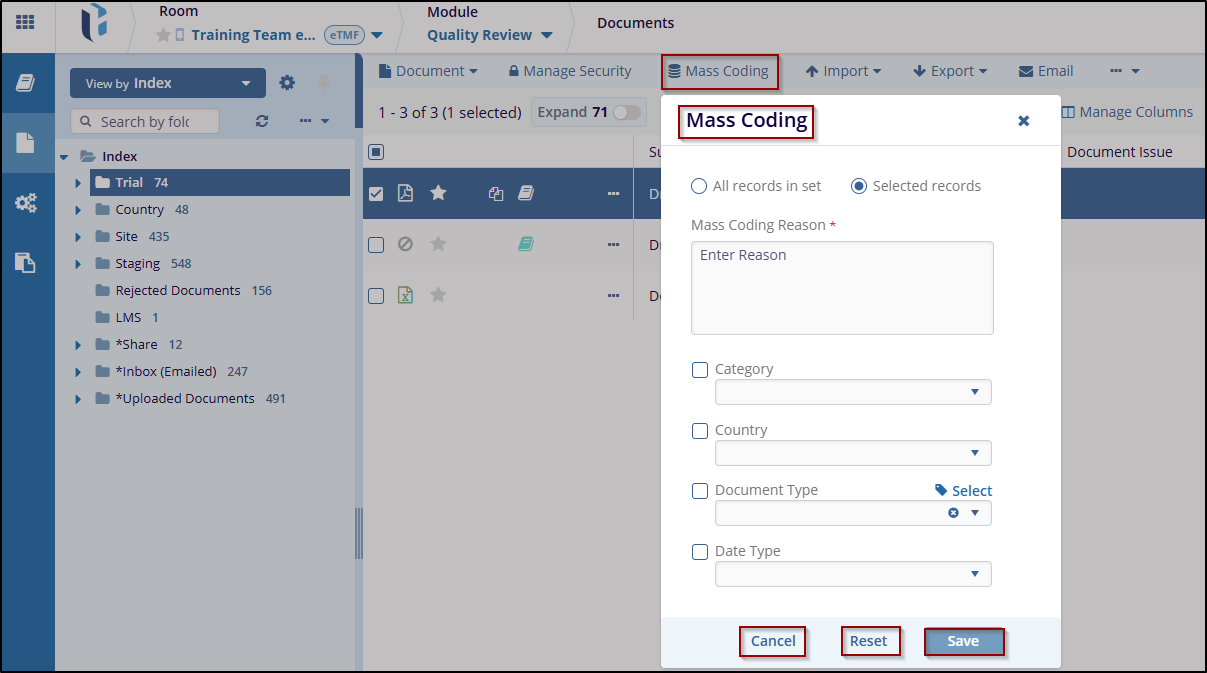
- Click on the Mass Coding button displayed in the top menu bar to open the pop-up window to mass code all documents in the grid. A new window labeled Mass Coding will open.
- Choose one of the two available options:
- All records in the set – Applies mass coding to all records.
- Select records – Allows manual selection of specific records.
- Enter required details in Mass Coding Reason – Provide a
reason for applying mass coding.
- Category – Select the appropriate category.
- Country – Choose the relevant country.
- Document Type – Specify the document type.
- Click Save to apply the changes or Click Reset to clear entered values, if do not wish to process. Click Cancel to discard changes and exit the window.

 Linkedin
 X
X

