
Audit Trail Parameters
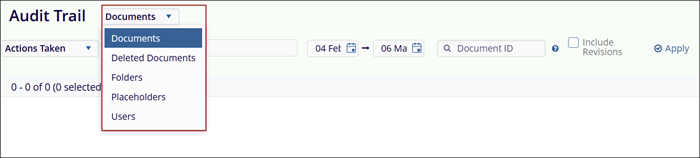
Users can retrieve the audit trail based on selected parameters. The options in the Actions Taken dropdown are displayed according to the chosen parameter.
The options in the Actions Taken dropdown are displayed according to the chosen parameter from the Scope Documents.
- Documents
- Deleted
- Folders
- Placeholders
-
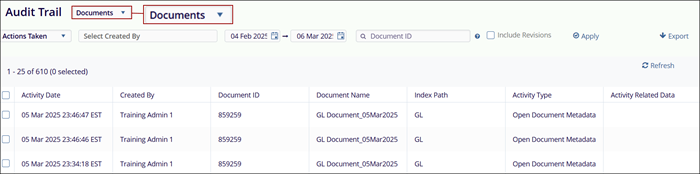
User Interface for Documents: When the audit trail for collaborate documents is retrieved, the data is presented in the following columns.
- Activity Date
- Created By
- Document ID
- Document Name
- Index Path
- Activity Type
- Activity Related Date
-
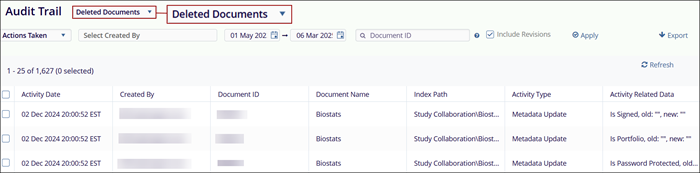
User Interface for Deleted Documents: When the audit trail for Deleted Documents is retrieved, the data is presented in the following columns.
- Activity Date
- Created By
- Document ID
- Document Name
- Index Path
- Activity Type
-
Activity Related Date
-
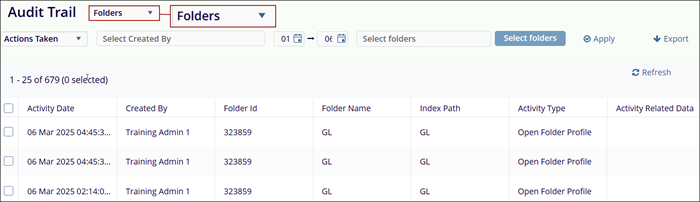
Folders: When the audit trail for Folders is retrieved, the data is presented in the following columns.
- Activity Date
- Created By
- Folder ID
- Folder Name
- Index Path
- Activity Type
- Activity Related Date
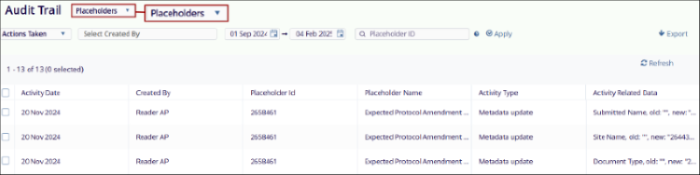
- Placeholders: When the audit trail for Placeholders is retrieved, the data is
presented in the following columns.
- Activity Date
- Created By
- Placeholder ID
- Placeholder Name
- Index Path
- Activity Type
- Activity Related Date
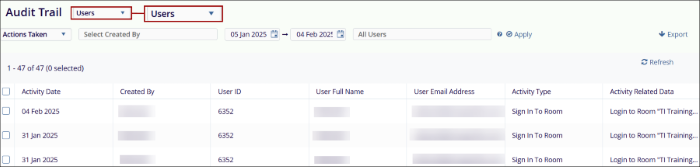
- Users: When the audit trail for Users is retrieved, the data is presented in the
following columns:
- Activity Date
- Created By
- User ID
- User Full Name
- User Email Address
- Activity Type
- Activity Related Data
© 2025 Trial Interactive. All Rights Reserved

