
The Room Index
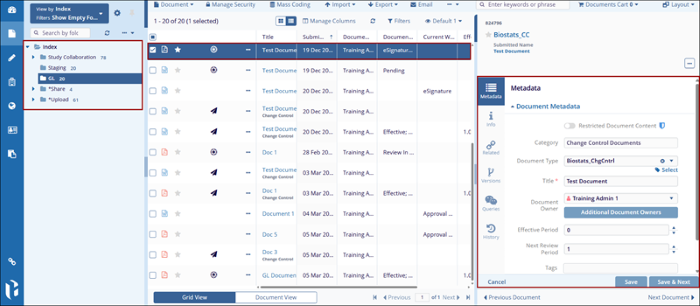
The Room Index is structured a system. It consists of parent and child folders, which can
either be cloned during room creation or created from scratch. Each Trial Interactive room can
have a completely customized index structure, as no two index configurations are necessarily
identical.
- Documents emailed to a room's inbox are stored in each user's inbox unless the room is set up differently.
- Documents uploaded directly to the room without metadata appear in each user's Upload folder, while those uploaded with metadata are placed in the Staging folder.
- Depending on room configuration, documents can also be uploaded directly to other index folders.
- Selecting the folders displays the documents within them in the documents grid at the center of the screen.
- Selecting a document from the grid loads its metadata in the Metadata Pane on the right side of the screen. It may also include Workflow, Queries, Versions, History, and eSignature tabs, depending on the document's context.
© 2025 Trial Interactive. All Rights Reserved

