
Course Management
The Course Management section empowers users to create courses from scratch and organize them into categories. The Course Management screen lists all courses created in GlobalLearn and lets users view course details, modify existing courses, and delete redundant courses. Furthermore, users can enroll or unenroll other learners, associate the courses with a training plan and/or a catalog, and control the course version by updating or modifying the course version.
Note:
- Users with the Company Admin and Instructor Role can access the Course Management module and create, edit, or delete courses.
- Users added as Group Owners and/or Site Co-ordinators can access the Course Management module and perform the functions if Owner Permissions are enabled.
Access Course Management
To access the Course Management page, follow the steps below:
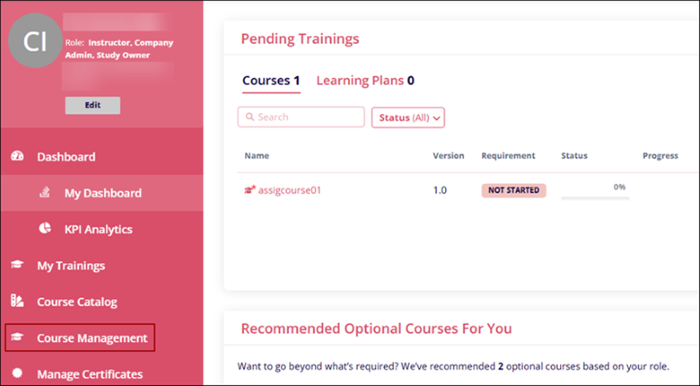
- Click on Course Management from the left-hand navigation pane.
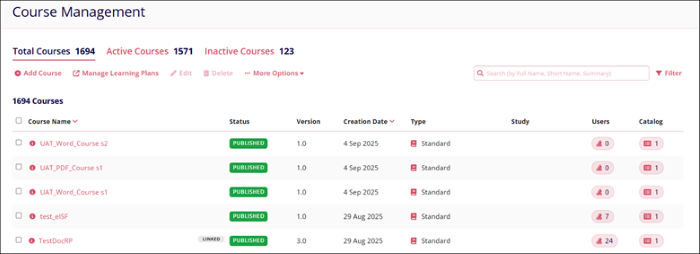
- The Course Management Metadata Panel displays a list of courses that depend upon the
user's access level and the following details.
- Course Name
- Status
- Version
- Creation Date
- Type
- Study
- Users
- Catalog

TransPerfect’s Trial Interactive is an industry leader in practical, global eClinical innovation
PRODUCTS
 Linkedin
 X
X
Didn’t find what you need?
Our dedicated Project Management and Client Services team will be available to meet your needs
24 hours a day, 7 days a week.
Toll Free:
(888) 391-5111
help@trialinteractive.com
© 2025 Trial Interactive. All Rights Reserved

