
Initiate Workflow
To initiate an administrative workflow, follow the steps below:
- Check Out an effective document and check back in the updated version.

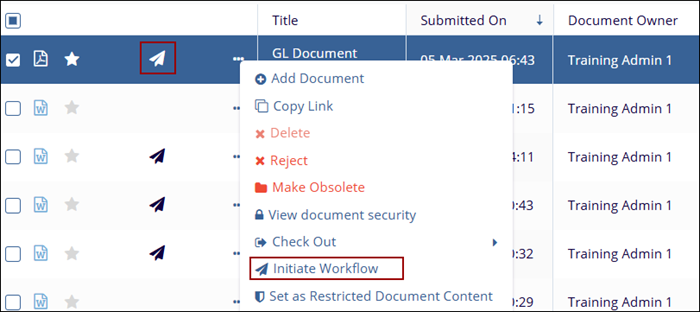
- Click on the paper plane icon which indicates the document is ready for workflow or
click on the three-dot menu and select the Initiate Workflow option.
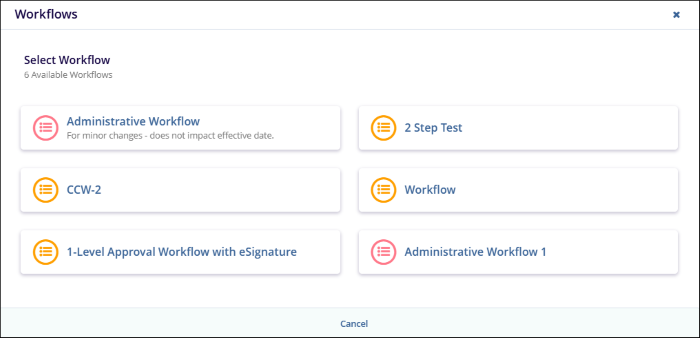
- On the Workflows wizard, select the appropriate workflow for specific document type.
- Specify the number of approvers to complete a stage in the workflow in the Minimum
Number of Approvers section and click on the Next button.

- Within the eSignature step, select the signers who should review the document and
click on the Review button.

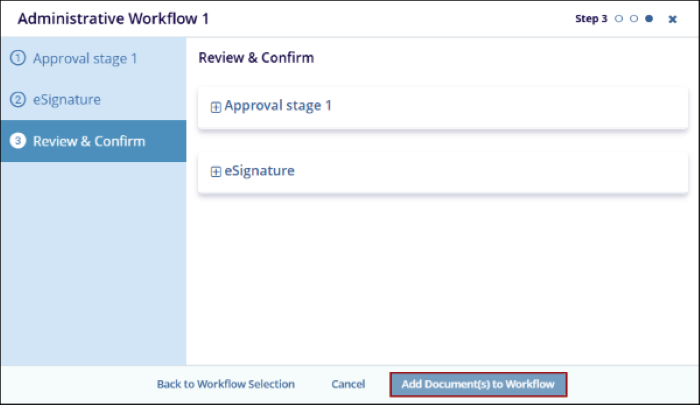
- In the Review & Confirm step, verify the details and click on the Add
Document(s) to the Workflow button for users to begin the review.
© 2025 Trial Interactive. All Rights Reserved

