
Proposing a Country as an RMS (Reporting Member State)
Follow the steps below to propose a country as RMS:
- Click the Countries icon on the far-left side of the screen and
click on the CTIS tab.
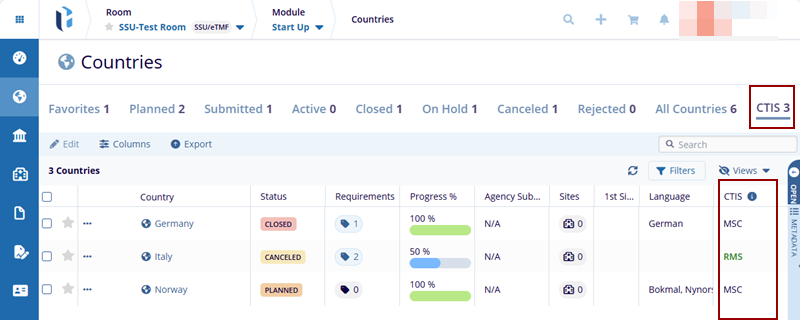
- Click on the name of the country the Country Details page is displayed with the
Propose As RMS (Reporting Member State) button up in the index panel.
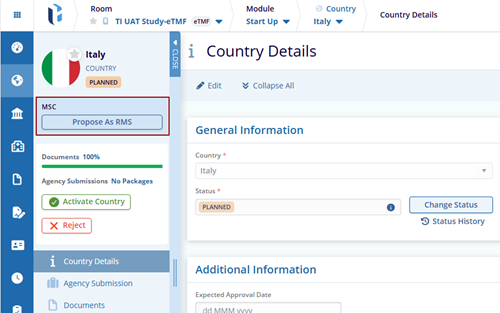
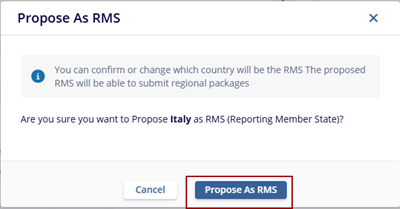
- Click the Propose As RMS. The Propose As RMS window is displayed with the
Cancel and Propose As RMS buttons.
- The user navigates to the Country Details page, and PROPOSED AS RMS text is
displayed in the index panel with two additional options: Propose Other and Confirm.
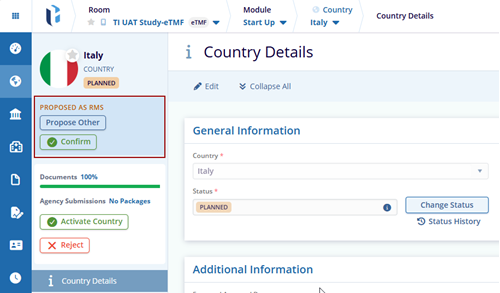
Note: Once the selected country has the status Proposed As RMS, then the user can submit the Regional Packages.
© 2025 Trial Interactive. All Rights Reserved

