
Proposing RMS to other countries
Follow the steps below:
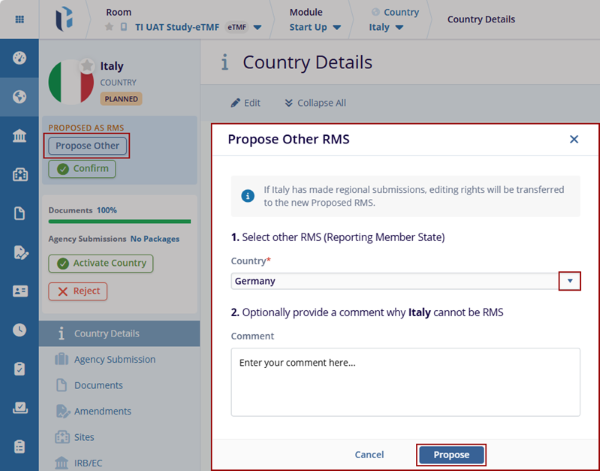
- Click the Country where the RMS is already proposed.
- Click the Propose Other option in the index
panel.
Note: If the selected Country does not act as an RMS (Reporting Member State). Then the Administrator has the right to change the RMS (Reporting Member State) once confirmed.
- The Propose Other RMS window is displayed. Expand the arrow of the Country field and
select the Country from the list, and click the Propose button.
Note: If the user changes the RMS to another Country, then all the editing rights will be transferred to the new Country.
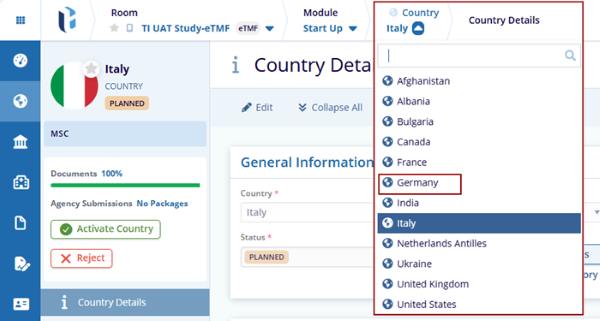
- Navigate back to the Country drop-down in the breadcrumbs and
select the newly proposed Country. The Country Details page is
displayed.
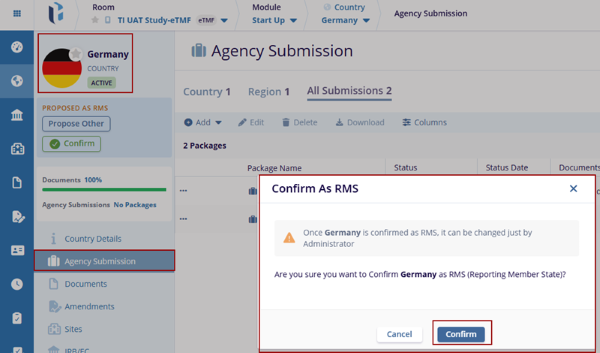
- Click the Agency Submission, and the user confirms that the Package created is available.
- Click the Confirm button. The Confirm As RMS window is displayed with Cancel
and Confirm buttons.
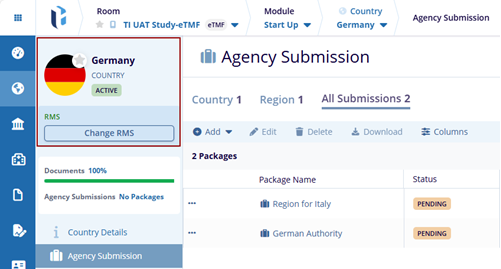
- Click the Confirm button. The page gets
refreshed, and the new Country status will be RMS
(Reporting Member State).
© 2025 Trial Interactive. All Rights Reserved

