
Create Contact View
To create a Contact View, follow the steps below.
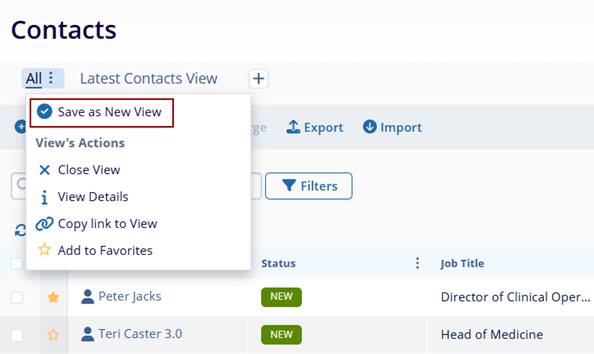
- Click on the All hamburger icon and select Save as New View.
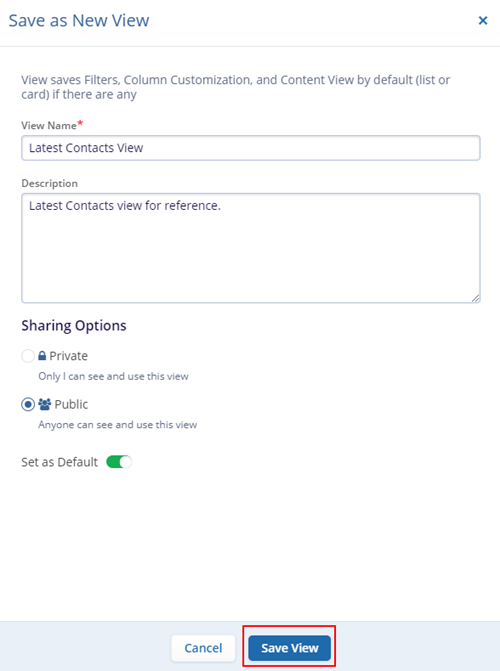
- On the Save as New View screen, specify View Name, Description, and Sharing Options-Private or Public. For the Public option,
- Set the view as a default by enabling the Set as Default toggle button.
- Once all the details are entered and configured, click on the Save View
button.
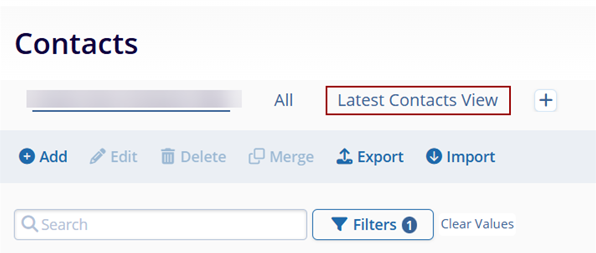
- Once successfully saved, it appears on the Contacts home screen.

TransPerfect’s Trial Interactive is an industry leader in practical, global eClinical innovation
PRODUCTS
 Linkedin
 X
X
Didn’t find what you need?
Our dedicated Project Management and Client Services team will be available to meet your needs
24 hours a day, 7 days a week.
Toll Free:
(888) 391-5111
help@trialinteractive.com
© 2025 Trial Interactive. All Rights Reserved

