
Analytics
The Analytics module is an integration of CTMS data with the TI Analytics tool, providing users with seamless access to comprehensive study data directly from the CTMS interface. Users can now utilize TI Analytics to track key study metrics, monitor site performance, and gain insights into trial outcomes with dynamic, customizable visualizations.
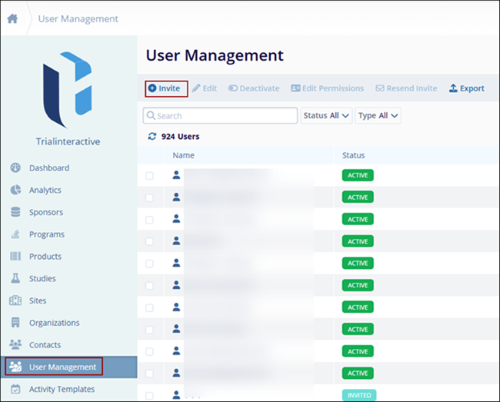
Note: The Analytics module needs to be explicitly enabled for users at
the domain level and the study level.
Analytics at the Domain Level
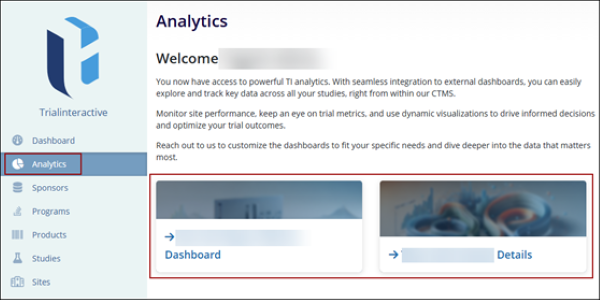
To access the TI Analytics dashboard at domain level, follow the steps below:
- From the left-hand navigation pane, select the Analytics module.
- The Analytics module page displays the welcome message. Click on the link to access the
dashboards and dashlets.
Analytics at a Study level
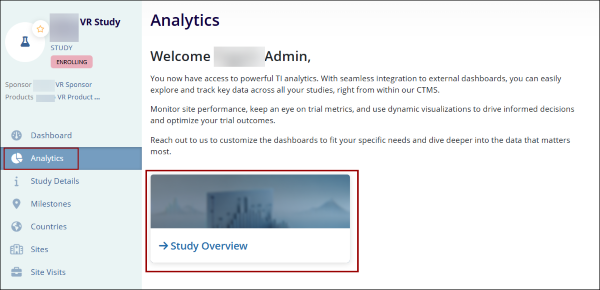
To access the TI Analytics dashboard at a study level, follow the steps below:
- From the left-hand navigation pane, select Studies.
- On the Studies screen, click on a Study Name.
- On the Study Details screen, click on Analytics from the left-hand navigation pane.

TransPerfect’s Trial Interactive is an industry leader in practical, global eClinical innovation
PRODUCTS
 Linkedin
 X
X
Didn’t find what you need?
Our dedicated Project Management and Client Services team will be available to meet your needs
24 hours a day, 7 days a week.
Toll Free:
(888) 391-5111
help@trialinteractive.com
© 2025 Trial Interactive. All Rights Reserved

