
Export Milestone Template at the Global Level
Users can export a list of all Milestone Templates within the Milestone Templates library that have been created within the CTMS.
To export the miltestone templates, follow the steps below.
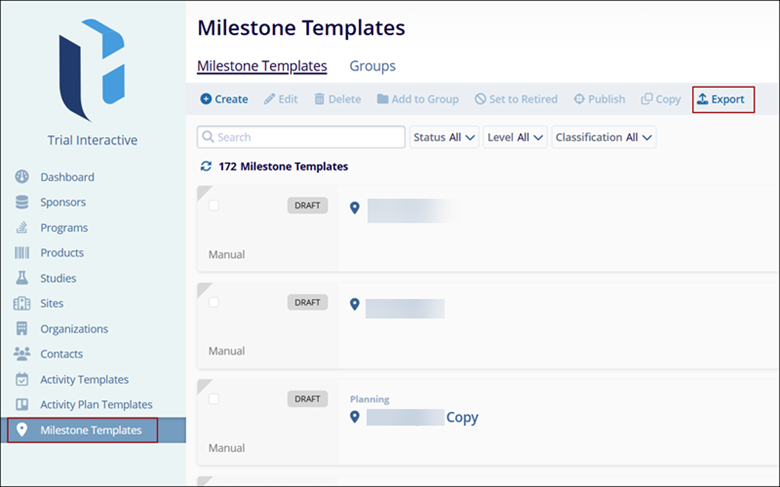
- From the left-hand navigation links, click on the Milestone Templates which opens the Milestone Templates window.
- Click the Export button.
-
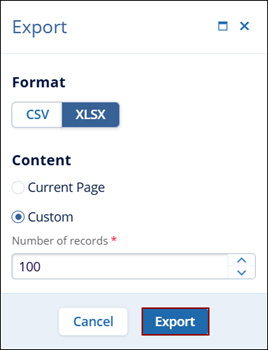
For the CSV or XLSX file formats, select either of the following:
- Current Page: This option will export data on the existing page of the Contacts screen.
- Custom: Here, specify the number of records to be exported by either clicking on the up and down arrows or entering the number of records since it is a free-text field.
- Click Export.
-
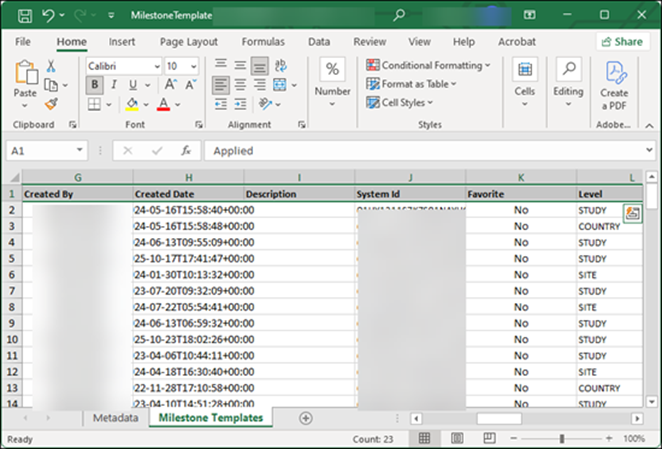
The exported file displays the milestone data in the ‘Milestone tab’

TransPerfect’s Trial Interactive is an industry leader in practical, global eClinical innovation
PRODUCTS
 Linkedin
 X
X
Didn’t find what you need?
Our dedicated Project Management and Client Services team will be available to meet your needs
24 hours a day, 7 days a week.
Toll Free:
(888) 391-5111
help@trialinteractive.com
© 2025 Trial Interactive. All Rights Reserved

