
Record Types
The Record Types page displays the records based on the Categories, such as:
- Quality Events
- CAPA
- Action Items
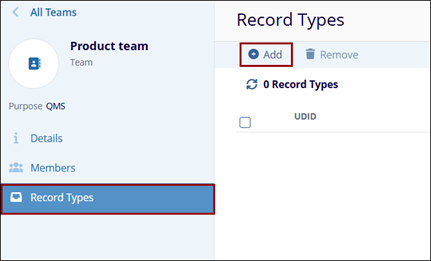
To add the Record Types, follow the steps below:
- Click the Add button on the top menu bar
within the Record Types page.
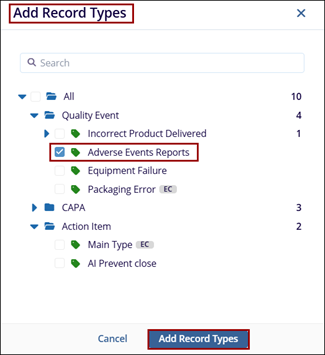
- The Add Record Types pop-up window is displayed with the list of Categories.
- Expand the Category and select the records from the list.
- Click the Add Record Types button at the bottom of the Add Record Types
pop-up window. Note:
To select all records at once from the chosen category, check the All checkbox in the Add Record Types pop-up window.
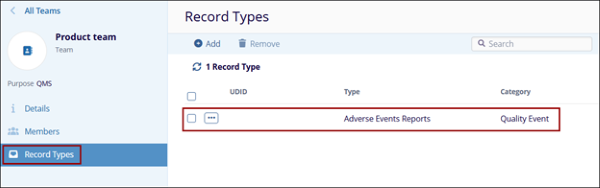
- The selected record type from the chosen category is displayed on the Record
Types page.
Search
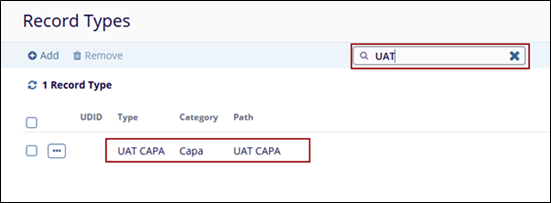
The Search functionality allows users to quickly locate specific users or groups within the Members page by entering keywords or filters. As the user types in the search bar, the grid dynamically updates to display matching results, making it easier to manage large lists of members.
- Click the Search field and type the keyword or initial Teams name and click enter.
- The search results should be displayed on the main Members page.

TransPerfect’s Trial Interactive is an industry leader in practical, global eClinical innovation
PRODUCTS
 Linkedin
 X
X
Didn’t find what you need?
Our dedicated Project Management and Client Services team will be available to meet your needs
24 hours a day, 7 days a week.
Toll Free:
(888) 391-5111
help@trialinteractive.com
© 2025 Trial Interactive. All Rights Reserved

