
Stage Status
The Stage Statuses tab allows Admin users to manage a list of stage statuses used in QMS workflows by adding, editing, or deleting them as needed. These statuses define the possible actions and transitions within each stage.
Add Stage Status
To add a stage status, follow the steps below:
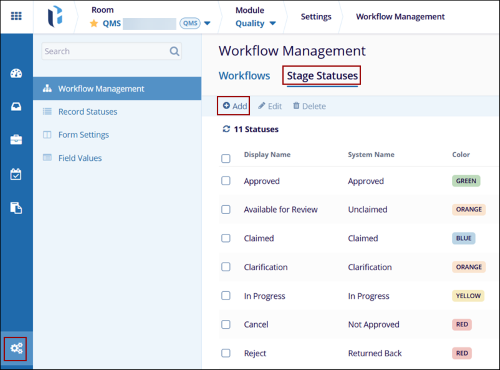
- From the Quality module, click on the Settings menu > Workflow Management > Stage Statuses tab.
- Click on the +Add button within the Stage Statuses tab.
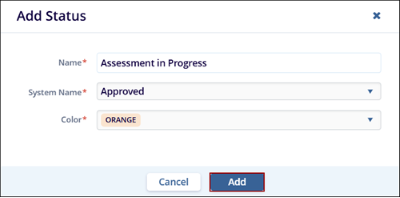
- On the Add Status dialog box, mandatorily add the following details and click on the
Add button.
- Name*: Add a name for the status.
- System Name*: Select a system name from the available dropdown options.
- Color*: Select a color from the available dropdown options.
Note: The stage status will be displayed alongside a record when it
reaches the corresponding workflow stage as defined in the workflow configuration.
Edit Stage Status
To edit the stage status, follow the steps below:
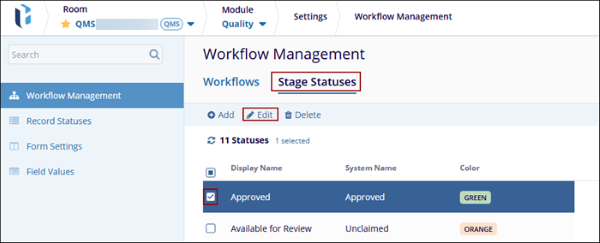
- Select a stage status within the Stage Statuses tab and click on the Edit button.
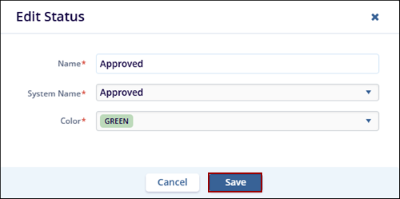
- Make the necessary changes to the Name*, System Name*, and Color* fields and click on
the Save button.
Delete Stage Status
To delete a stage status, follow the steps below:
- Select a stage status within the Stage Statuses tab and click on the Delete button.
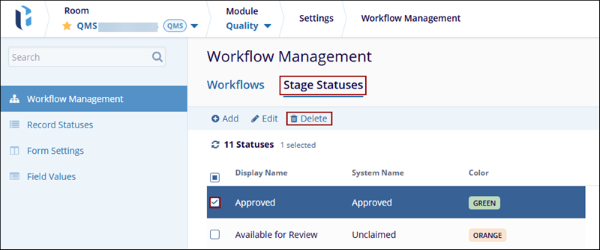
- Click on the Delete button on the confirmation popup.

© 2025 Trial Interactive. All Rights Reserved

