
My Direct Reports
The My Direct Reports dashlet displays course statistics of those users (reportees) who are in direct association with or report to another user (Manager). The Manager users can retrieve transcripts or training logs of their direct reportees by applying certain criteria.
- Enter the user’s name in the search box to search for a specific user.
- Click on the Sort By dropdown to sort the
- Navigate to the My Direct Reports dashlet and click on the user name whose transcripts
need to be retrieved.
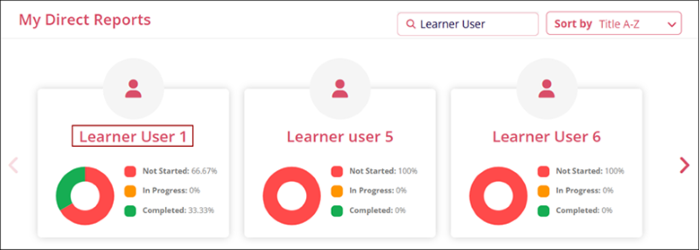
Refer to the My Direct Reports section that details the procedure to retrieve the transcripts and other associated functionalities.
Note:
- Users with the Manager role can view and access the transcripts of only those users who are their direct reportees.
- Users with the QA and Company Admin roles can view and access the transcripts of all GlobalLearn users.

TransPerfect’s Trial Interactive is an industry leader in practical, global eClinical innovation
PRODUCTS
 Linkedin
 X
X
Didn’t find what you need?
Our dedicated Project Management and Client Services team will be available to meet your needs
24 hours a day, 7 days a week.
Toll Free:
(888) 391-5111
help@trialinteractive.com
© 2025 Trial Interactive. All Rights Reserved

