
My Transcript
The My Transcript tab allows users to retrieve their course-wise training logs regardless of their user role, meaning that users in any role can retrieve transcripts of their courses.
To retrieve training logs with My Transcript, follow the steps below.
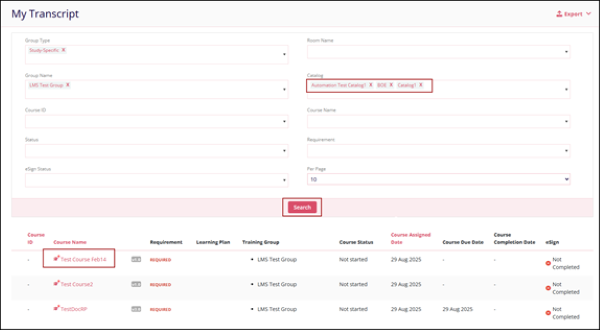
- Click on the Transcript > My Transcript from the left navigation pane.
- On the My Transcript screen, apply filters in the available filter criteria. Note:
In the filters, the user can select multiple options to view the required course.
Filter Name Description Group Type Study Specific Non-Specific
Group Name Name of Training groups created in GlobalLearn Course ID Course IDs associated with a particular course in GlobalLearn Status Not StartedIn Progress
Completed
Per Page Number of records to display on each page. Room Name Name of the Rooms created in GlobalLearn Catalog Catalog names created in GlobalLearn Course Name Name of the courses Requirement Required Optional
eSign Status Not Applicable (N/A) Completed
Not Completed - Click on the Search button, which displays the courses as per he applied filters.
- Click on a hyperlink course name to view the course details.
Export
To Export the My Transcripts data, click on the Export button on the top right of the screen and follow the standard steps detailed in the Export section.

TransPerfect’s Trial Interactive is an industry leader in practical, global eClinical innovation
PRODUCTS
 Linkedin
 X
X
Didn’t find what you need?
Our dedicated Project Management and Client Services team will be available to meet your needs
24 hours a day, 7 days a week.
Toll Free:
(888) 391-5111
help@trialinteractive.com
© 2025 Trial Interactive. All Rights Reserved

