
Sponsor Entity Management
Create Product for a Sponsor
To create a product at sponsor level, follow the steps below:
- Click on the Sponsor name, The Sponsor Details screen opens.
.png)
- Click on Products from the navigation link to the left side of the screen. This
opens the product screen at the Sponsor level.
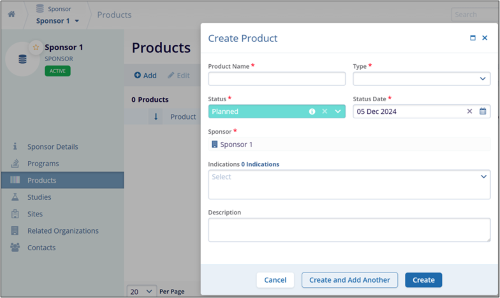
- To create a new product and the associated actions, refer to Product section. Note:
Ensure all mandatory fields (marked with a red asterisk (*) are filled out before attempting to save the product.
The Sponsor field is pre-filled and cannot be edited.
Create Program for Sponsor
To create a program at sponsor level, follow the steps below.
- On the Sponsors screen, click on the sponsors’ name.
.png)
- On the Sponsor Details screen, click on the Program link from the left-hand Navigation menu.
- On the Program Details screen, click on the +Add button at the top of the
grid.
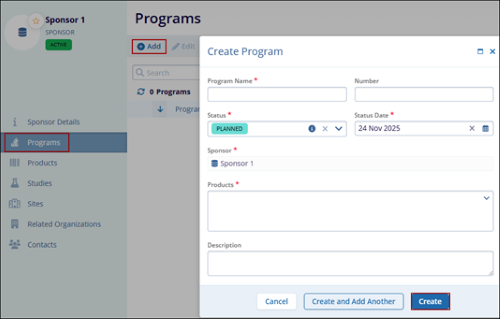
- To create a new program and the associated actions, refer to Programs section.
Note:
- Ensure all mandatory fields (marked with a red asterisk *) are filled out before attempting to save the program.
- Use the calendar widget to easily select the status date.
- Review all entered information for accuracy before clicking the Create button.
- If the program number is too short or too long, adjust it to meet the 3-to-255-character requirement.
Create Study for Sponsor
To create a study at a sponsor level, follow the steps below.
- On the Sponsors screen, select the sponsor's name.
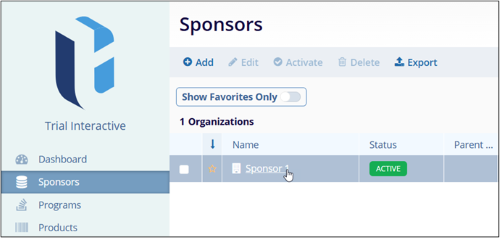
- On the Sponsor Details screen, click on the Studies link from the left-hand Navigation menu.
- On the Studies screen, click on the +Add button to add a new study at the sponsor
level.
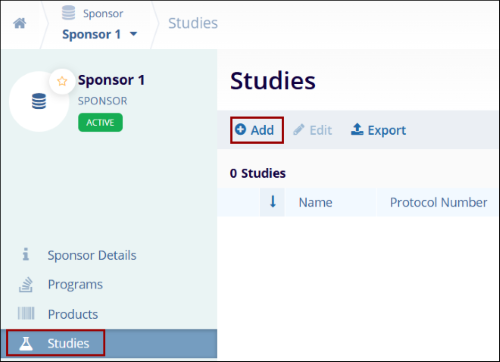
- To create a study and the associated actions, refer to Add Studies section.
Edit Sites within Sponsor
To edit a site within a sponsor, follow the steps below:
- On the Sponsors screen, select the sponsor's name.
.png)
- Follow the steps detailed in the Editi Site in a Study to edit the site details.
Create Organization within sponsor
To create an organization at the sponsor level, follow the steps below.
- On the Sponsors screen, select the sponsor's name.
.png)
- On the Sponsor details screen, select Related Organizations from the left-hand
navigation pane.
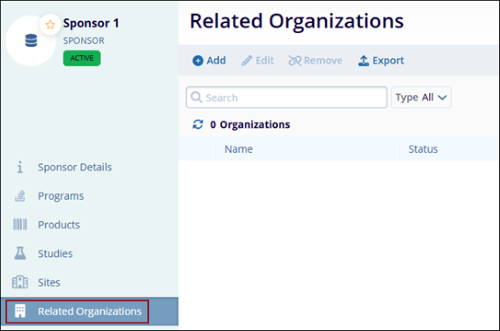
- Follow the steps detailed in the relevant sections of Organizations to add, edit, remove and export organizations.
Create Contacts within sponsors
To create contacts at the sponsor level, follow the steps below.
- On the sponsor's screen, click on the sponsors’ names.
.png)
- On the Sponsor details screen, select Contacts from the left-hand navigation menu.
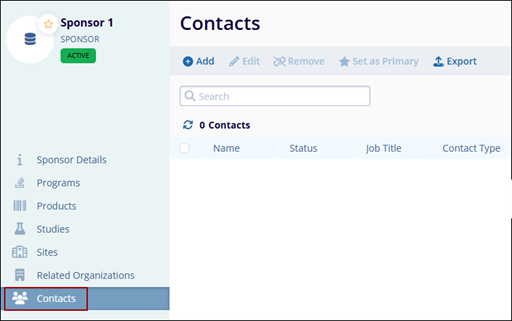
- Follow the steps detailed in the relevant sections of the Contacts to add, edit, remove, and set as primary contact.

TransPerfect’s Trial Interactive is an industry leader in practical, global eClinical innovation
PRODUCTS
 Linkedin
 X
X
Didn’t find what you need?
Our dedicated Project Management and Client Services team will be available to meet your needs
24 hours a day, 7 days a week.
Toll Free:
(888) 391-5111
help@trialinteractive.com
© 2025 Trial Interactive. All Rights Reserved

