
Schedule Activity Plans
To schedule Activity plans, follow the steps below:
- From the left-hand navigation links, click on Studies.
- Select a study by clicking on the study’s name.
.png)
- On that Study’s screen, navigate to the left-hand navigation links and select Activity Plans.
- On the Scheduled Activity Plan screen, select the Scheduled Plans tab >
+Add button.
.png)
- On the Schedule Activity Plans for Study screen, perform the following.
- Select Templates: Click on Schedule plan or the templates tile to select the
template and click on the Next button.
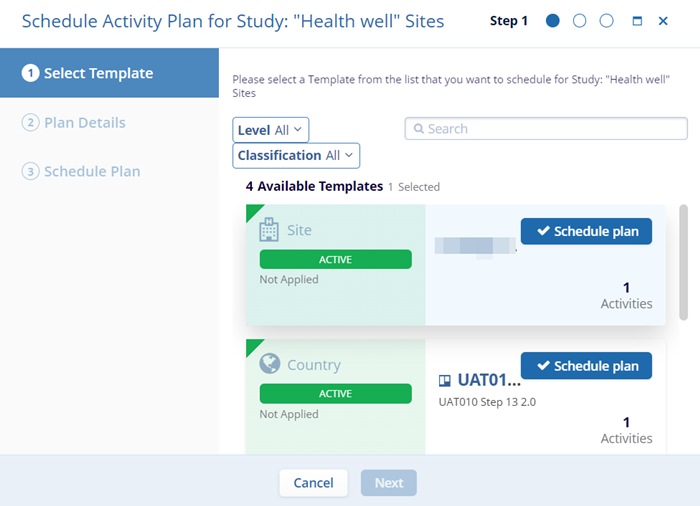
- Plan Details: On the Plan Details screen, add a suitable plan description and click
on the Next button.
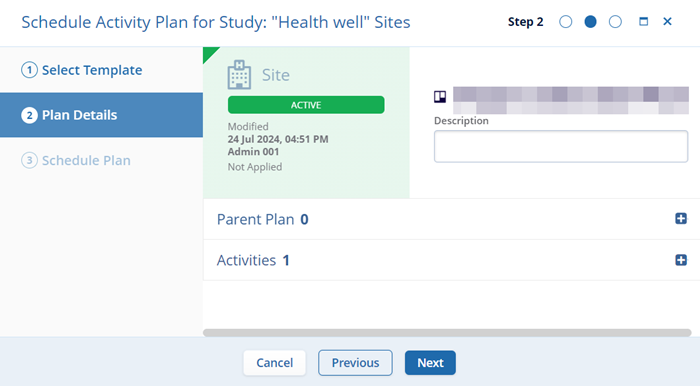
- Schedule Plan: On the Schedule Plan screen enter the Stie, Country, and Study Status
from their dropdown options and select Schedule.
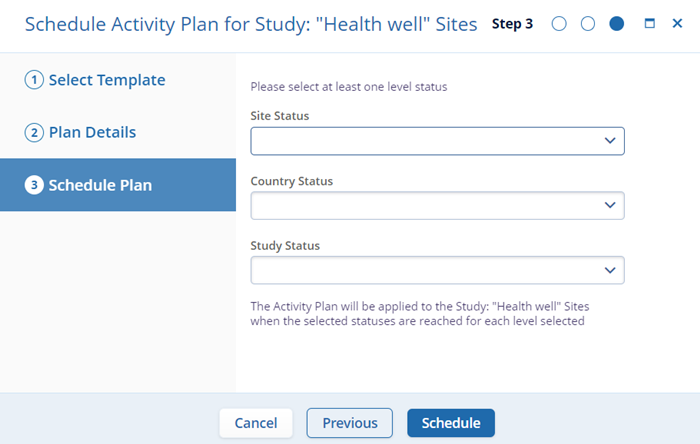
Note:- When a study-level template is selected, the Schedule Plan section displays only the Study Status dropdown.
- When a country-level template is selected, the Schedule Plan section displays the Study Status and Country Status dropdowns.
- When a site-level template is selected, the Schedule Plan section displays the Study Status, Country Status, and Site Status dropdowns.
- Select Templates: Click on Schedule plan or the templates tile to select the
template and click on the Next button.

TransPerfect’s Trial Interactive is an industry leader in practical, global eClinical innovation
PRODUCTS
 Linkedin
 X
X
Didn’t find what you need?
Our dedicated Project Management and Client Services team will be available to meet your needs
24 hours a day, 7 days a week.
Toll Free:
(888) 391-5111
help@trialinteractive.com
© 2025 Trial Interactive. All Rights Reserved

