
Cancel Quality Event
Authorities in the workflow stages can cancel a Quality Event record depending on the configurations in the workflow stages. Once an authority cancels a Quality Event, the record is removed from the workflow.
To cancel a Quality Event, follow the steps below:
- Create a Quality Event record as an originator user and send it to the first stage of the approval workflow by following the steps detailed in the Create Quality Event section.
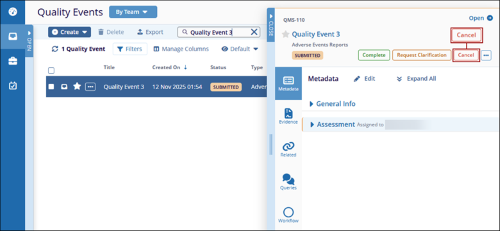
- As an authority in the first stage, open and claim the Quality Event record, and
click on the Cancel button.
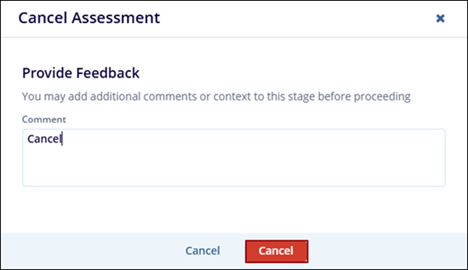
- On the Cancel Assessment dialog box, enter the necessary comments and click on the
Cancel button.
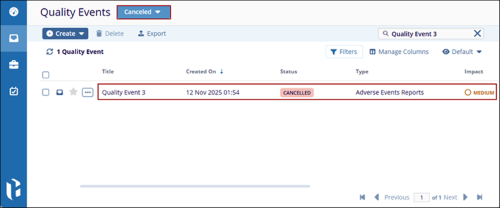
- Once the record is successfully cancelled, it is removed from the workflow.
- Admins and record owners can view cancelled records in the Canceled view.
- Additionally, depending on the notification’s configuration in the approval workflow, the authorities receive an email notification stating that the record was canceled.
© 2025 Trial Interactive. All Rights Reserved

