
Reject Quality Event
Authorities within the workflow stages can reject a Quality Event record based on the stage-specific configuration. Rejections typically occur during the Approval stage by the designated Approver. When a record is rejected, it is sent back to the previous stage. For instance, if a record is rejected at the Approval stage, it will return to the Investigation stage.
To reject a Quality Event record, follow the steps below:
- Create a Quality Event record as an originator user and send it to the first stage of the approval workflow by following the steps detailed in the Create Quality Event section.
- As the authorities within the first and second stage, complete the transition to the last stage by following STEP 1 to STEP 6 detailed in the Approve Quality Event section.
- As the assigned authority in the ‘Approval’ stage, claim the record and click on the
Reject button.
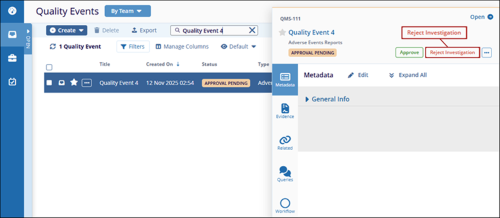
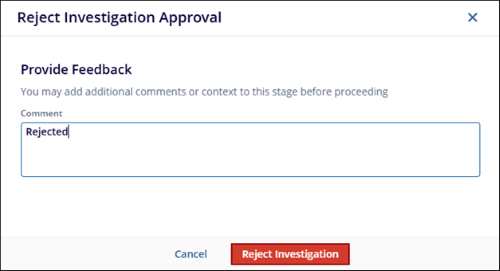
- On the Reject Investigation Approval form, enter the comments and click Reject
Investigation.
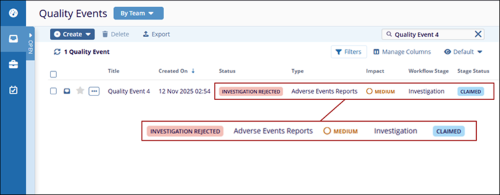
- Once the record is rejected, it gets transitioned to the previous stage.
- Additionally, the authority in the previous stage of the workflow receives an email notification stating the record is returned for revision, depending on the notification’s configuration in the workflow.
- As the authority in the previous workflow stage, make the necessary revisions and transition the record to the next stage.
- As approver, approve, resolve, and close the record by following the STEP 9 to STEP 14 as detailed in the Approve Quality Event.
© 2025 Trial Interactive. All Rights Reserved

