
Closing a Team Edit
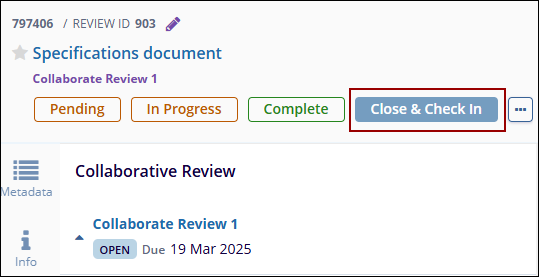
Once the collaborators have completed editing the document, any one of the collaborative reviewers can close the session and check back in the document. A team edit can closed directly from the documents metadata panel from the Documents library and from the Collaborate modal.
Method 1
To close a team, edit, follow the steps below:
- Click on the Close & Check In button from the documents metadata panel.
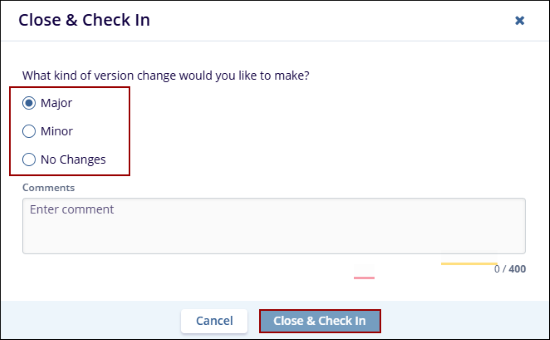
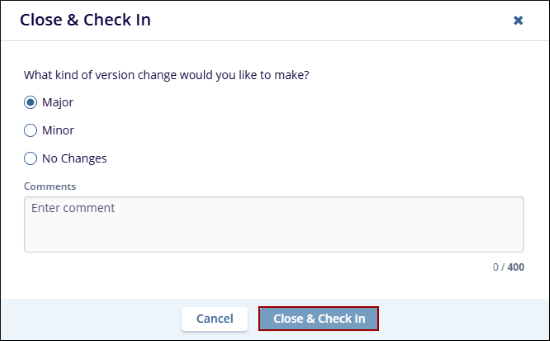
- On the Close & Check-In popup, select any one of the version change options,
optionally enter comments, and click on the Close & Check In button.
Method 2
To close a team edit through the Collaborate modal, follow the steps below:
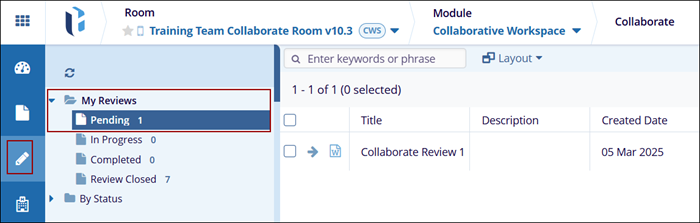
- Navigate to the Collaborate modal and expand the My
Reviews > Pending folder.
- Select the review and click on the Collaborate Status tab from
the quick view panel on the right-hand side.
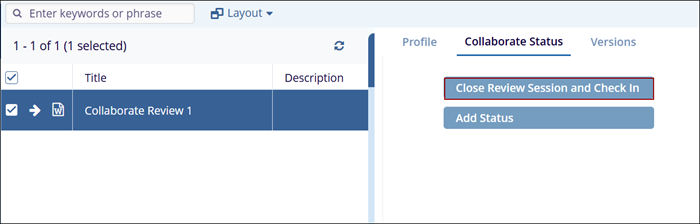
- Complete the check-in process by adding the type of revision
and any comments, and then click Close Review Session
and Check-In.
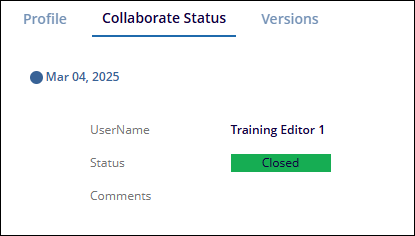
- The Collaborate Status tab will display the status as closed with the User Name
and Comments, if any.
© 2025 Trial Interactive. All Rights Reserved

