
Add Documents to Placeholder
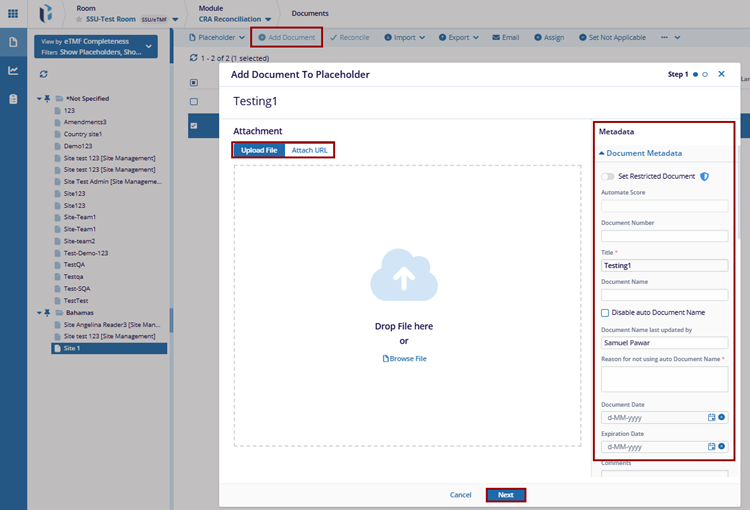
The Add Document refers to uploading a document or attaching a URL, such as an eTMF (Electronic Trial Master File) document. These documents may include queries, audits, or any other files that need to be added to placeholder.
To Add Document to Placeholder, follow these steps:
- Click the Add Document button and a Add Document to Placeholder window will appear.
- Upload file or Drag and Drop File in the pop-up window. Complete the required metadata fields to add document for the placeholder.
- Once metadata is filled, click the Add button to apply the changes.
Set Not Applicable
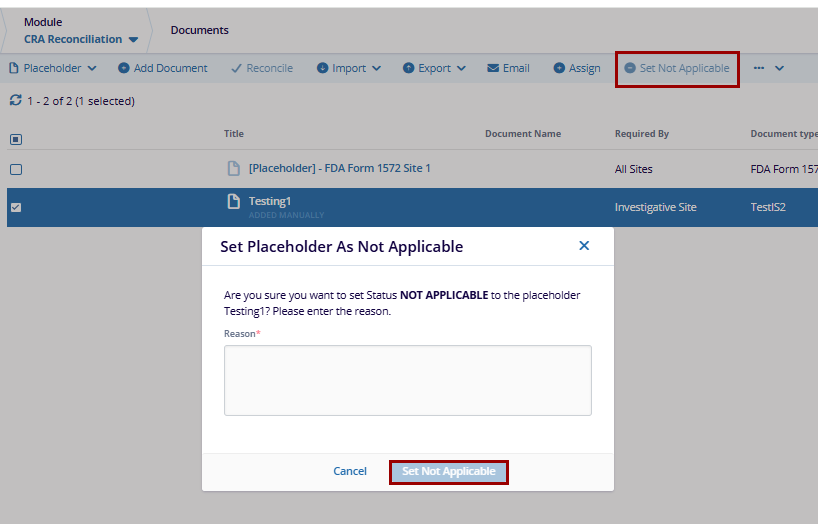
The Set Not Applicable refers to an option that allows users to mark a specific placeholder as not applicable to the selected document. This can help manage placeholders that are irrelevant for the selected document.
- Click the Set Not Applicable button, and a Set Placeholder as Not Applicable window will appear.
- Enter the specific reason to set the status not applicable for selected placeholder.
- Click the Set Not Applicable button to apply the changes.

 Linkedin
 X
X

