
Quality Review
The Trail Interactive’s Quality Review module allows users to conduct an audit/quality review of document filed within eTMF. The functionality includes:
- Audit Profile Creation
- Configuration of Audit Parameters
- Assignment of Audit Roles
- Document Review
- Rectification of Failed Documents
To access the Quality Review module, follow the steps below:
- Click the waffle menu (navigation grid).
- Select the Quality Review module.
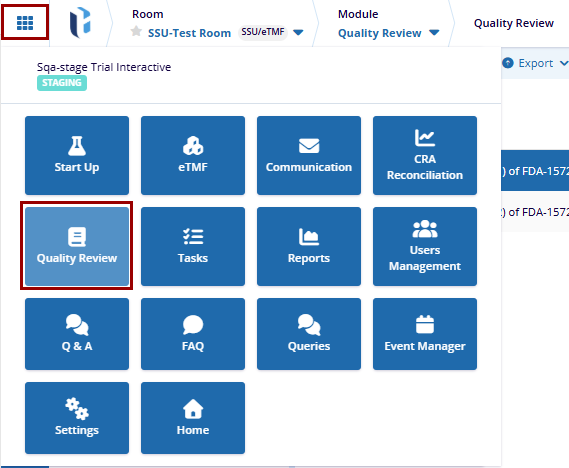
- Ensure the user has the necessary role assigned (Auditor, Audit Responder or Audit Manager role) to access the Quality Review module.
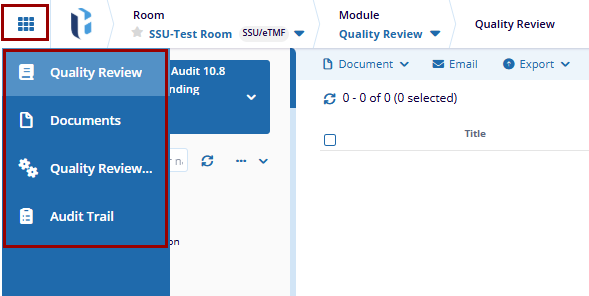
- The Quality Review module displays the following tabs within the left-hand
navigation pane.
- Quality Review: This section allows users to choose the audit profile within which a they are either assigned either as an Auditor, Audit Responder, or Manager and view documents associated to that audit
- Documents: The section allows users to add documents and perform all other document related actions.
- Quality Review Settings: This section allows users to configure the audit profile settings.
- Audit Trail: This section allows users to
retrieve an audit trail log based on certain parameters.
Note: The Quality Review module shall be accessible to users who
are assigned the role of Auditor, Audit Responder, or Audit Manager within the
configured audit profile.

 Linkedin
 X
X

