
Export All Audits
The Export All Audits refers to a comprehensive collection of audit records that includes all available audits. It typically encompasses the Audits Source, Audits, Auditors Source, Auditors, and Status.
To Export All Audits, follow these steps:
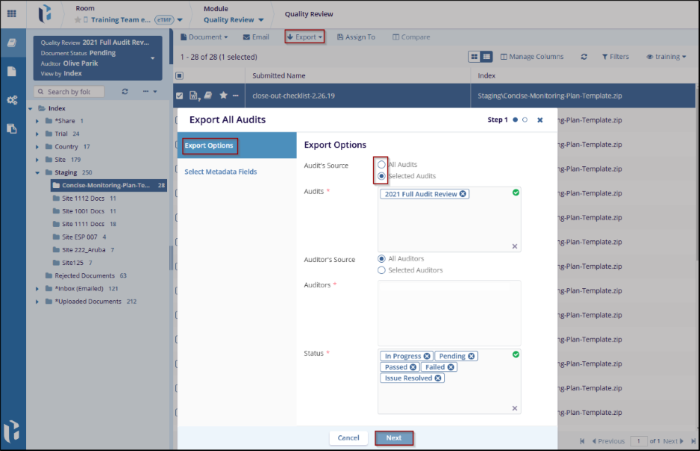
- Click the Export dropdown, and select Export All Audit. A new Export All Audit window will open, and the options are available such as Export Options and Select Metadata Fields. By default, the Export option is selected.
- In the Export Options under Audit’s source, select the radio button as per requirement. For example, All Audits or Selected Audits.
- Click the Next button to move to the next step, where the user can configure
the metadata fields.
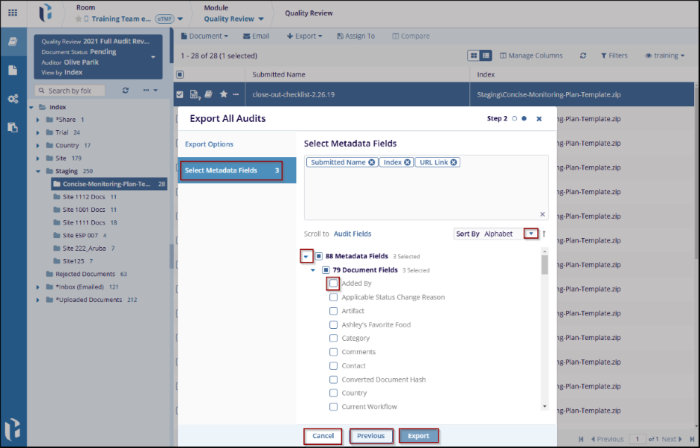
- After selecting Next in the Export Options step to the Select Metadata Fields section.
- Check the boxes next to the metadata fields that need to be included in the export.
- Click the Export to proceed to the final export step or click on the
Previous Button to make changes to the previous option. Click on
Cancel to discard the changes and it will be returned to the previous screen.
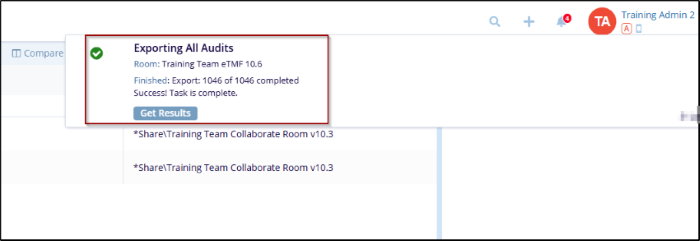
- Once click the Export button, a confirmation message will display on the
screen with the room name and finish.

 Linkedin
 X
X

