
Trial Interactive Login process
The Trial Interactive Room Administrator has sent invitations to users, and they will receive an email with a registration link.
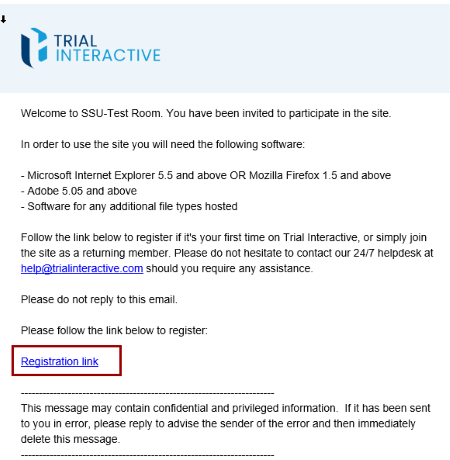
Note: Users complete a one-time registration when they receive
their first room access email. After registering, they can sign in directly.
Invitations to additional rooms do not require re-registration—new rooms
automatically appear on the home page, and users will continue to receive email
notifications for future invitations.
Method-1
Follow the below steps to Sign in to Trial Interactive:
- Click the Registration link from the bottom of the message.
- User will be directed to the Trial Interactive user account registration
page.
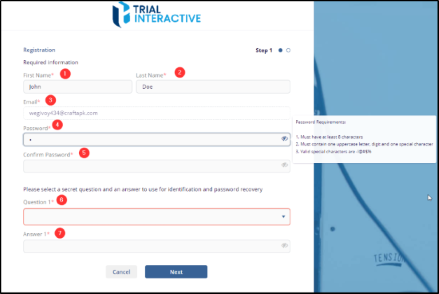
- Enter your First Name and Last Name the provided field.
- Email address will be automatically filled by the system.
- Create a secure password, then re-enter it in the Confirm Password field to
verify. Note: Hover over the Password field to view the tooltip with specific password requirements.
- Select your password recovery question from the dropdown list.
- Enter in your answer in the Answer field and click Next to take you to Step 2.
Method - 2
Follow the below steps for Registration - Optional Information:
- On this page, enter your contact address, phone number, and any other relevant details.
- Click on Register to proceed.
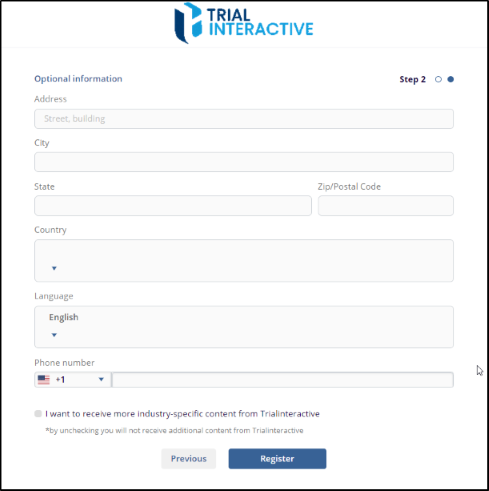
- A confirmation pop-up message will appear, indicating that user have successfully registered, after clicking the registration button. The pop-up message will also include a link to the room that has been assigned to you.
- Click on the bottom link to access the room. It will be redirected to the Trial
Interactive login page. Enter the username and password provided during the
registration process, then click the Sign In button to log in.
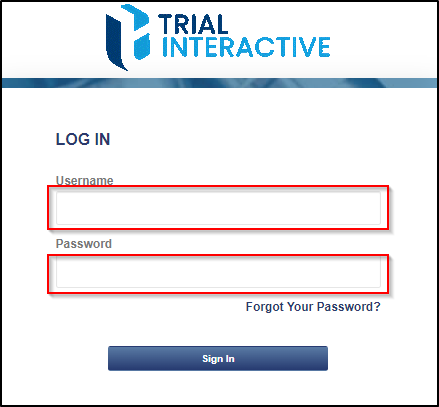
- The user will be redirected to the Trial Interactive Home Page.

 Linkedin
 X
X

