
Index & View Configuration
Views
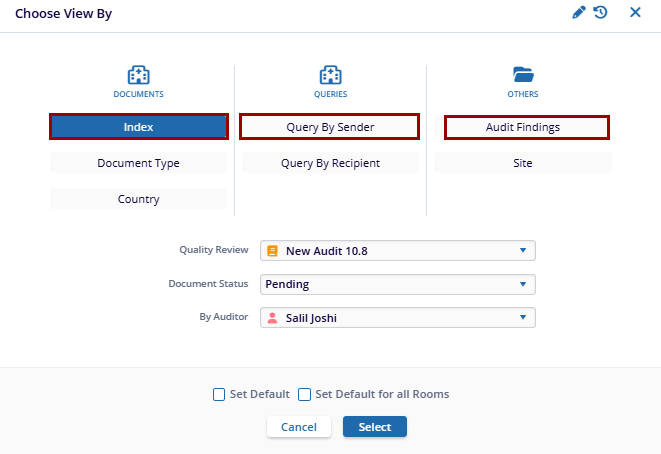
The Views functionality enables users to customize the folder structure and select documents based on specific categories. In the Choose View By section, users can select a view for a quality review based on requirements.
- Navigate to the Quality Review tab and select the Choose View By dropdown located at the top of the Index Pane.
- Select a view from the available options within the listed categories.
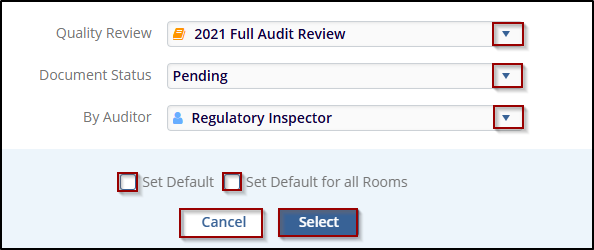
View Name Description Documents Index Allows users to view or filter documents included in the index folder. Document Type Provides the option to view documents by their categories (e.g., Trial, Country, Sites, etc.). Country Allows users to filter documents based on the country associated with them. Queries Query By Sender This enables users to view queries based on who sent them. Query By Recipient Allows filtering of queries based on the recipient. Others Audit Findings This option is likely for viewing documents or queries related to audit results or findings. Site Filters content based on the associated site (possibly for multiple site-based documents or records). - Click the Quality Review dropdown and choose the applicable audit profile.
- Click the Document Status dropdown, select a status to filter the audit profile view accordingly.
- Use the By Auditor dropdown to filter the grid based on a specific auditor.
- Select the Set Default checkbox to designate the chosen view as the default.
- Select the Set Default for all Rooms checkbox to apply the selected view as the default across all rooms.
- Click Select to apply the chosen view settings.
- After applying the selection from View by options, the user can see the Index folder, based on the selections.
Index
The Room Index is structured as a tree-like system, with Index as the root folder. It consists of parent and child folders, which can either be cloned during room creation or created from scratch. Here users can create folders and subfolders to configure the index structure and export the index structure in either HTML, Excel or Word formats.
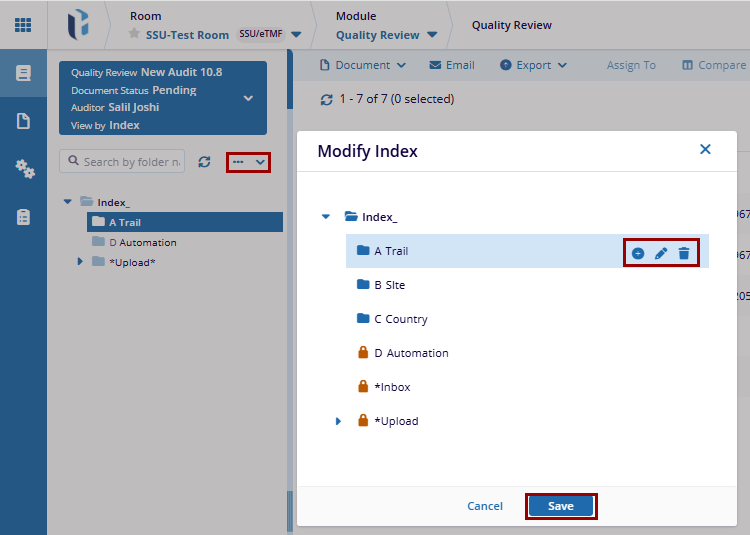
Modify Index
The Modify Index option enables users to create, update, or remove folders and subfolders within the defined hierarchical structure.
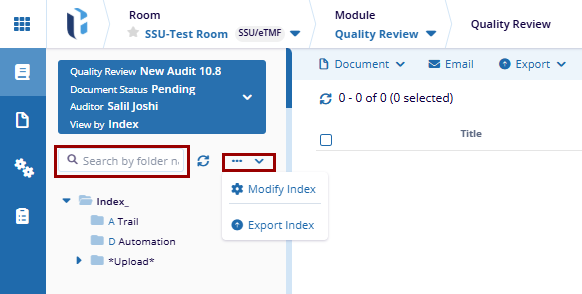
Export Index structure
Users can export the index in HTML, Excel or Word formats.

 Linkedin
 X
X

