
QC Review
The QC Review module displays all workflows within the eTMF room in which the logged-in user is assigned to at least one stage of the configured approval workflow. From this module, users can claim documents, approve or reject documents, and raise queries as part of the review process.
In addition to workflow actions, the module supports standard eTMF document functionalities, including document upload, security management, view configuration, grid customization, and import/export capabilities.
The QC Review module is accessible only to users who are assigned to a stage within an approval workflow configured in the eTMF room.
To access the QC Review module, follow the steps below:
- Click the waffle menu (navigation grid) at the top left.
- Select the QC Review module.
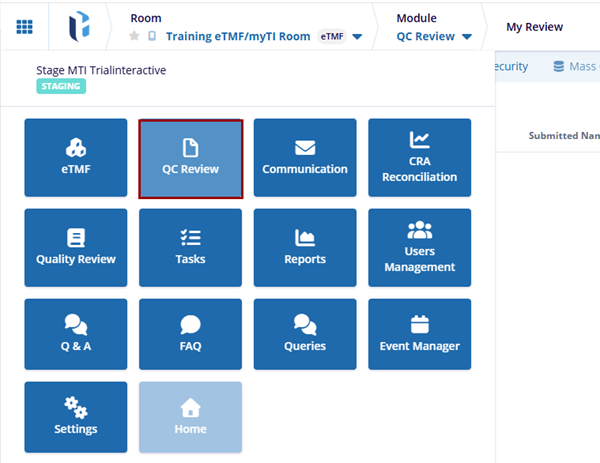
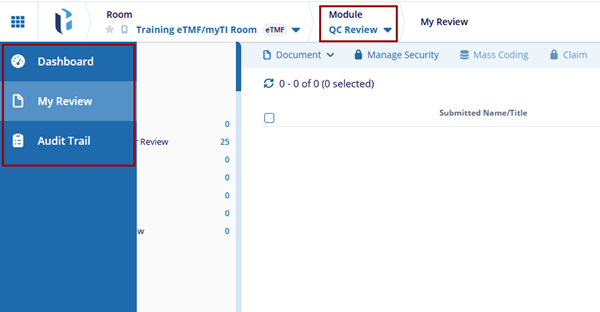
- The QC Review module displays the following tabs in the left-hand navigation
pane:
- Dashboard: Displays configurable dashlets that present study room information and reporting date.
- My Review: Lists workflows in which the logged-in user is assigned to a workflow stage, enabling the user to claim, and review documents, and complete workflow actions in accordance with the configured approval process.
- Audit Trail (Administrators Only): Provides access to a detailed log
of document-related activities. Administrators can retrieve and filter
records based on defined criteria to view user actions and system events.
Quality Control Dashboard

 Linkedin
 X
X

