
Reports
Explore Job Aids for more help:
Job Aids
Trial Interactive provides out-of-the-box (OOTB) standard reports and ad-hoc reporting capabilities for users within eTMF rooms, along with the ability to configure custom reports on reporting dashboards. It also includes OOTB graphical dashboards for key performance indicators (KPIs), enabling users to monitor study performance and operational metrics. These reports and dashboards are available at both the study level and cross-study level, allowing users to analyze data across individual studies or multiple studies within the organization.
All users such as Readers, Editors, Managers and Admins can access and create the reports within eTMF.
To access the reports module, follow the steps below:
- Click the waffle menu (navigation grid) at the top left.
- Select the Reports module.
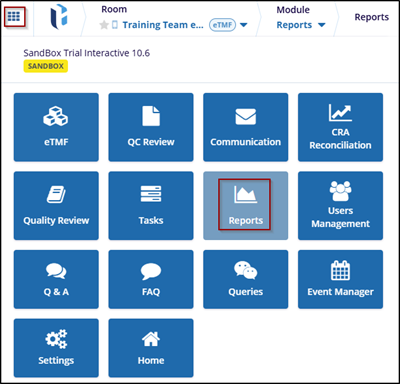
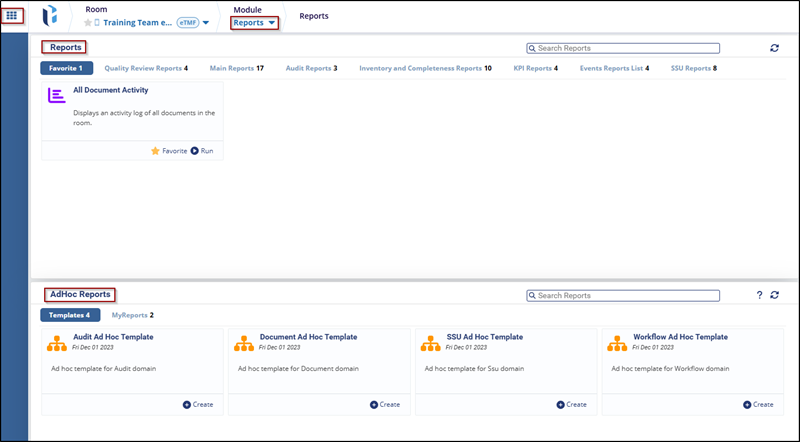
- The Reports module, includes the following tabs:
- Reports: These include Favorite, Quality Review, Main Reports, Audit Reports, KPI Reports, Inventory and Completeness Reports, CWS Reports, KPI Reports, TI Doc Reports, Events Reports List and SSU Reports, etc.
- Ad Hoc Reports: Customizable templates that allow users to generate reports based on requirements.

 Linkedin
 X
X

