Navigation/MainNav/Elements/Logo
eTMF
CTMS
Collaborate
QMS
GlobalLearn
SSU
E-Feasibility
MyTI
Solutions
  • Help Topics

    Learn more about the Trial Interactive CTMS platform and all its related topics by visiting this section

    • How to Use CTMS

      This section explains the use of CTMS.

    • Dashboard

      This section explains the CTMS Dashboard in detail..

    • Sponsors

      This section describes the Sponsors module in CTMS.

    • Programs
    • Product
    • Studies

      This section describes the Studies module in CTMS.

      • Navigation
      • Add Studies
      • Edit Studies
      • Study Settings
        • General
        • Regions
        • Milestone Templates
        • Access Permissions
        • Import
        • Fields
        • Site Visit Types
        • Site Visit Cancellation Reason
        • Subjects
        • Import Status
      • Study Dashboard
      • Study Milestones
      • Study Countries
      • Study Sites
      • Study Subjects
      • Study Organization
      • Study Contacts
      • Team
      • Study Activities
      • Study Activity Plans
    • Site Visit Documentation

      This section describes Site Visit Documentation in CTMS with detail information.

    • Organizations

      This section describes the Organizations in the CTMS.

    • Contacts

      This section describes Contacts, Levels of Contact Creation, Editing, and Deleting in the CTMS.

    • User Management

      This section describes the process of User Management in CTMS.

    • Activity Templates
    • Activity Plan Templates
    • Milestones

      This section describes the Milestones module in the CTMS.

    • Analytics

      The TI Analytic module displays dashboards at the domain and study level.

    • CTMS FAQs

      This section provides you with frequently asked questions and their answer about Trial Interactive CTMS.

Access Permissions

Explore Videos for more help:

Videos

  • How to Assign Access Permissions for a Study (06:04)

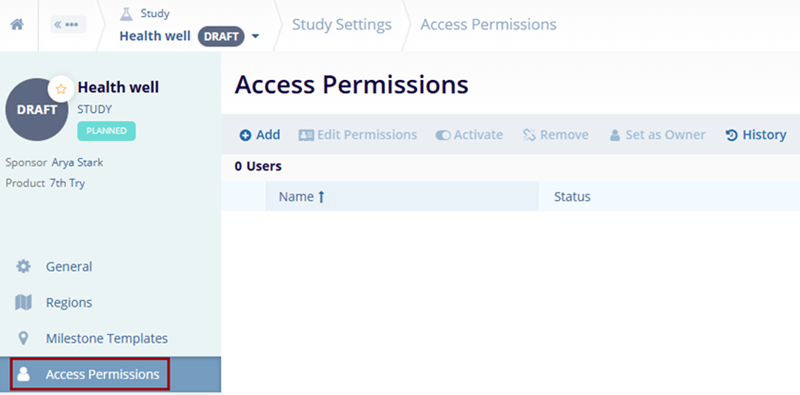
To manage the access permissions from the Study Settings, follow the steps below.

  1. Navigate to the Study Settings by following the steps detailed in the Study Settings section.
  2. Click on the Access Permissions link from the left-hand navigation pane.
  3. Refer to the Managing Study Access Permissions section to understand the standard steps.
Navigation/MainNav/Elements/Logo

TransPerfect’s Trial Interactive is an industry leader in practical, global eClinical innovation

Request a Demo
PRODUCTS
eTMF CTMS Collaborate GlobalLearn Solutions
GET IN TOUCH
Brands / L / linkedin Linkedin
Brands / T / twitter-square X

Didn’t find what you need?

Our dedicated Project Management and Client Services team will be available to meet your needs
24 hours a day, 7 days a week.

Toll Free: (888) 391-5111
help@trialinteractive.com
up-right-from-square
Support Center
angle-down

© 2025 Trial Interactive. All Rights Reserved

Home
Our Mission
Privacy Statement
globe-outline
English
caret-down