
Send to eFeasibility
Users can share Potential sites list from CTMS to eFeasibility, from the Sites grid within a study profile, ensuring the reduction of duplicate efforts for site entries across multiple applications.
To send sites to eFeasibility, follow the steps below:
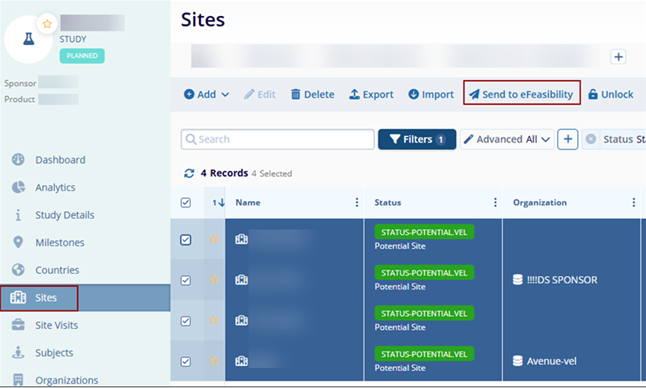
- Select sites with Potential status from the Sites grid within a Study profile.
- Click on the Send to eFeasibility button.
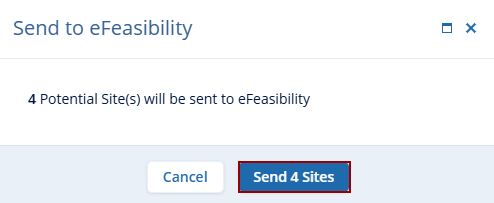
- On the Send to eFeasibility confirmation popup, click on the Send (number)
Sites button.
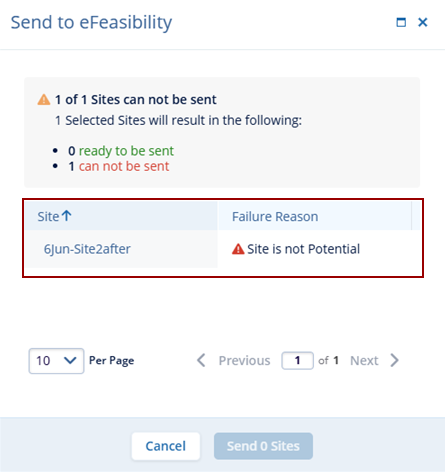
Important: The Send to eFeasibility dialog box displays the failure message incase the selected sites does not match the requirements.

TransPerfect’s Trial Interactive is an industry leader in practical, global eClinical innovation
PRODUCTS
 Linkedin
 X
X
Didn’t find what you need?
Our dedicated Project Management and Client Services team will be available to meet your needs
24 hours a day, 7 days a week.
Toll Free:
(888) 391-5111
help@trialinteractive.com
© 2025 Trial Interactive. All Rights Reserved

