
Reject
A new setting is added to support a Rejected folder within the eTMF for Room Administrators, and a new Document Rejection function is now available to Admins, Document Managers, and Room Managers. Any documents in the Upload, Inbox, Staging, and Rejected Folders are not considered to be Final. A Reason for Rejection dropdown is now available for workflow documents, and documents in the rejected folder/status are now excluded from eTMF health calculations.
To reject a document, follow the steps below.
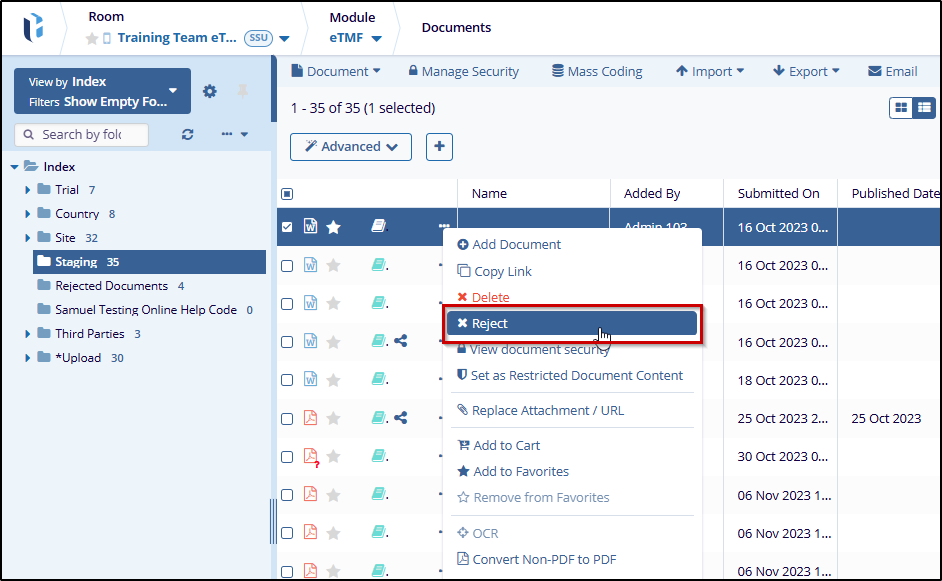
- Select a document by clicking on the checkbox.
- Right-click on the document or the three-dot menu in the grid
and select the Reject option from the document actions menu.
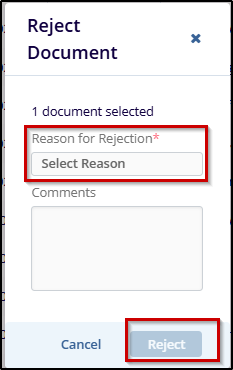
- Provide a rejection reason on the Reject Document pop-up and click on the Reject button.
Note:
- Users will not be able to drag and drop documents into this folder to prevent awarding an erroneous status should a non-rejected document be placed in this folder.
-
To reject a document outside of the standard workflow steps, the user must either be an administrator or must have the Document Manager action enabled on their user account.

 Linkedin
 X
X

