
Dashboards
Explore Job Aids and Videos for more help:
Job Aids
Videos
The Dashboard allows users to customize their workspace by adding, removing, or rearranging tabs based on user preferences. Administrator-level users can configure default dashboards for users according to the user access levels. Unless restricted, users can modify their dashboards as per the user's needs.
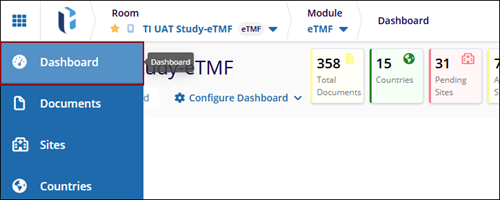
The Edit Dashboard allows users to customize the dashboard by adding or removing Tabs, reorganizing layout options, and customizing the dashboard to show the information that is most important to the user. It ensures a personalized view for better accessibility of required data.
Edit Dashboard
- Click the Dashboard button located at the top left of the toolbar.
- Click the Edit Dashboard, the Set Up Your Dashboard window will appear.
- It includes the relevant options, such as:
- Set Up Dashboards: for selecting or adding widgets
- Set Up KPI Dashboard: for managing key performance indicators
- Set Up Layout: for customizing the layout
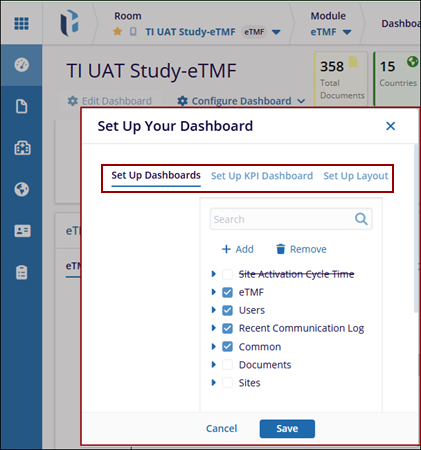
Set Up Dashboard
The Set Up Dashboards allows users to customize their dashboards by adding, removing, or managing dashlets. Dashlets are individual components that display specific types of data or functionality on the dashboard, helping users personalize their view to focus on the most relevant information.
- Click the Edit Dashboard, the Set Up Your Dashboard window will appear.
- The Set Up Your Dashboard window appears, expand the fields using the arrow and select
the required checkbox.

- Click on the Add button, and a new entry will appear under the list of available dashlet as (Collection Name). While adding a new dashlet, the user has to mention the Title and Description in the left-side fields.
- Once all necessary changes are completed. Click the Save button at the bottom of
the popup window to apply the changes.Note: The checkbox(s) selected for each dashlet from the set up your dashboard window will only display those tabs in the Dashboard.

- Click the Remove button to initiate the removal process. A confirmation window will appear with the message: "Are you sure that you want to remove the collection?”. Also, the user can only remove the newly added fields and not the pre-defined fields.
- Click Yes to confirm and remove the collection or click No to cancel the
action and keep the collection.

Set Up KPI Dashboard
The Set Up KPI Dashboard allows users to configure key performance indicator (KPI) metrics on the user’s dashboard. The selected dashlets are displayed on the top right corner of the screen.
- From the Set Up Your Dashboard window. Click on the Set Up KPI Dashboardoption.
- Expand the KPI Dashboard fields using the arrow and select the required
checkbox.

- Click on Reset to Default to revert all KPI configurations to the original system-defined settings
- Once all necessary changes are completed. Click the Save button at the bottom of
the popup window to apply the changes or click the Cancel button to discard changes.

- The selected tabs are displayed on the top right of the screen.

Set Up Layout
The Set Up Layout allows users to customize the visual structure of the dashboard by choosing a column-based layout. This ensures that the dashboard is organized according to user preferences. The user has the option to select from – One, Two, or Three Columns.
- From the Set Up Your Dashboard window. Click on the Set Up Layout.
- Select one of the available options of Layout:
- One Column: Arrange all dashlets in a single vertical column.
- Two Columns: Splits dashlets into two evenly spaced columns.
- Three Columns: Divides dashlets across three narrower columns.
- Click the Save button to confirm and apply the selected layout or Use the
Cancel button to discard the changes.


 Linkedin
 X
X

