
eTMF Risk Score
More about eTMF Risk Score
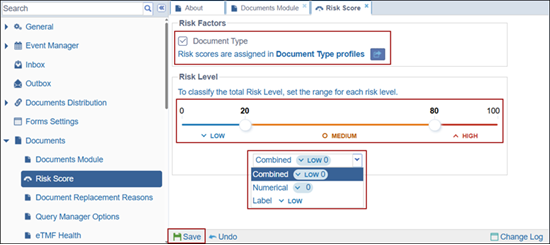
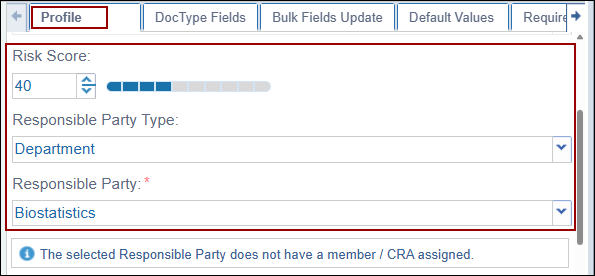
The Risk Score functionality allows users to classify documents based on predefined risk parameters. Before assigning a risk score to a document, the required configurations must be completed in the Document Settings and Document Type configuration.
To configure Risk Score settings, refer to the section:
Risk Score Configuration – Click here
To configure Risk Score at the Document Type level, refer to:
Document Type Configuration – Click here
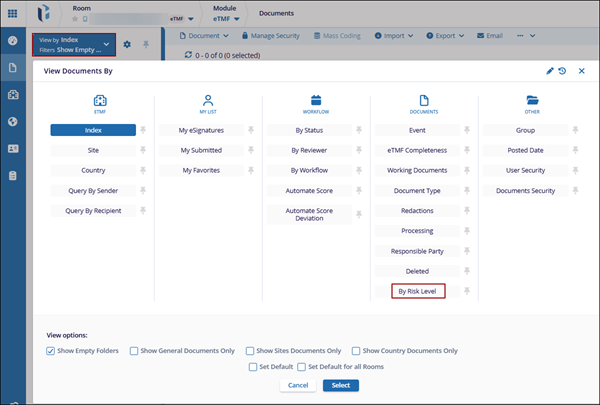
View Documents by Risk Level
Follow the steps below to View Documents by Risk Level:
- To upload a document, click here
- Ensure to associate a document type where the Risk Score is configured.
- Click the View By dropdown located above the folder panel.
- Select By Risk Level and click Select to apply the view.
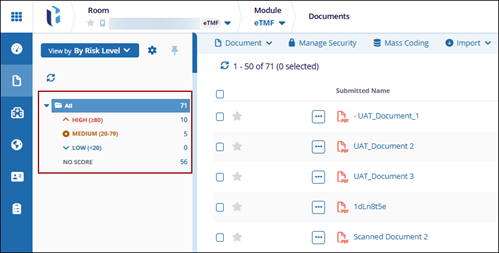
- The left panel now groups documents based on their assigned Risk Level categories
such as:
- High
- Medium
- Low
- No Score
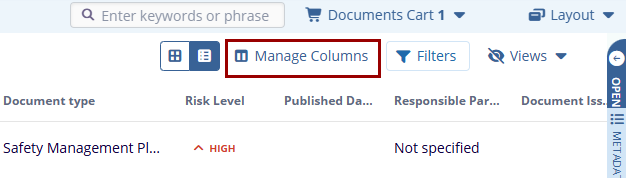
- Click Manage Columns from the toolbar.
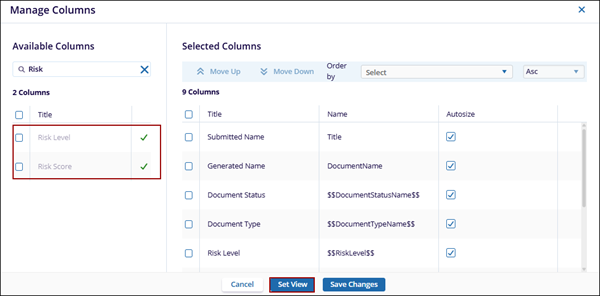
- In the Available Columns panel, search for Risk level and Risk Score columns.
- Select the columns and click the + icon to move them into the Selected Columns section.
- Click Set View and click Save Changes.
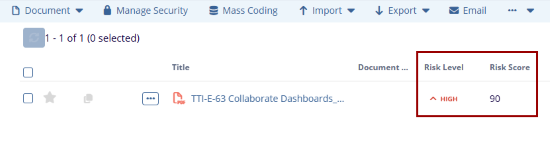
- The document grid will now display Risk Level and Risk Score for each
document.
- Select the document from the list. Open the Metadata panel on the right-hand side.
Scroll to view the Risk fields where the assigned Risk Score and Risk Level are
displayed.Note: The updated risk information is visible both in the grid and within the document metadata.

 Linkedin
 X
X

