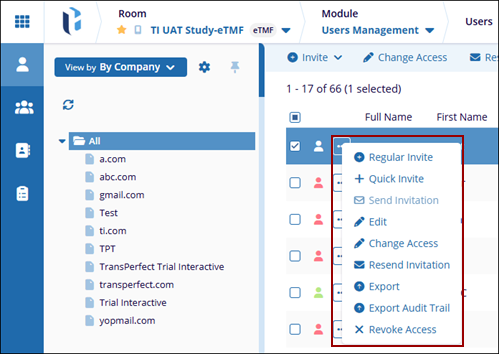
Actions Menu
The drop-down Action Menu provides quick access to all user management actions from one place. It appears when the user clicks the three-dot (⋯) icon next to a specific user in the Users list.
This menu helps administrators quickly perform key actions without leaving the Users
Management page, such as:
-
Invite users using Regular Invite or Quick Invite options.
-
Send or resend invitations to users who have not yet activated access.
-
Edit user details such as role, group assignment, and metadata.
-
Change Access to update user permissions or access period.
-
Export user information for reporting or documentation purposes.
-
Export Audit Trail to review user activity and access history.
-
Revoke Access to remove user access when no longer required.