
Queries Metadata Panel
The query metadata panel is located on the right side of the Queries grid. After selecting a query from the grid, users can access the following tabs within this panel:
- Message
- Info
- Metadata
Users assigned as recipients or initiators can use this panel to add additional assignees, respond to the query, and resolve the query.
Message tab
The Message tab within the query’s metadata panel displays the list of assigned users along with the message submitted by the query initiator. Query recipients can add responses and initiators can reply, add additional assignees, and mark the query as resolved when appropriate.
Info Tab
The Info tab within the Metadata panel of a query displays key details of the query such as:
- Query Id
- Type
- Query Status
- Category
- Created
Metadata
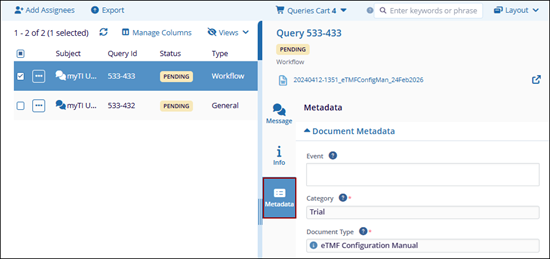
The Metadata tab displays the document’s metadata fields associated with the query in a read-only view.

 Linkedin
 X
X

