
Export Q&A
To export the Q&A list, follow the steps below:
-
Navigate to the Q&A Module and select the Q&A tab.
-
Select a question and click Export Q&A from the top menu bar.

-
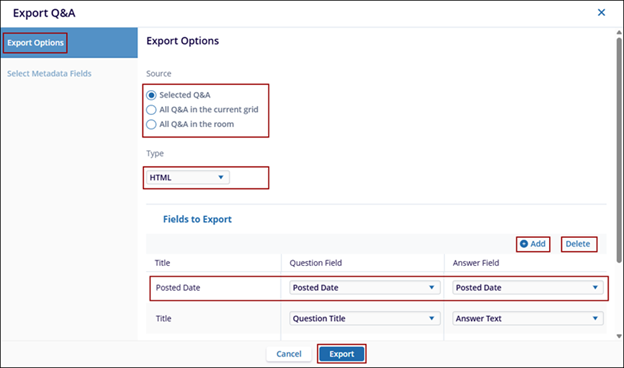
On the Export Q&A window, select a source from the following by clicking its radio button.
- Selected Q&A
- All Q&A in the current grid
- All Q&A in the room
-
Click the Type dropdown and choose any one of the following options.
- HTML
- Microsoft Excel
- Microsoft Word
-
In the Fields to export section, click +Add button to add new fields.
-
Select a field and click Delete to remove the field from the list.
-
Double click on the field title and rename it.
-
Click the Question Field and Answer Field dropdown and select the required option.
-
Click Export.

 Linkedin
 X
X

