
Ask a Question
Users can create questions either by navigating to the Documents tab within the eTMF module to create a document-specific question, or by accessing the Q&A module to create a general question.
Document Specific Question
To create a Document Specific Question, follow the steps below:
- Navigate to the eTMF Module and select the Document tab.
- Right-click on a document or by click the ellipsis icon to access the document activities menu.
- Select Ask a Question.
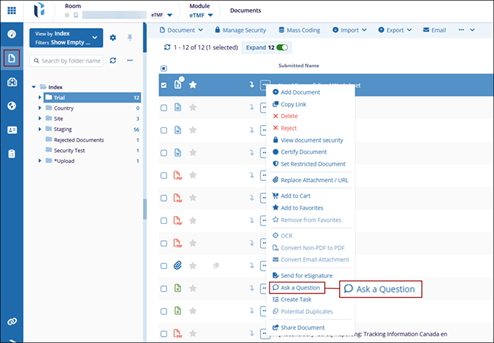
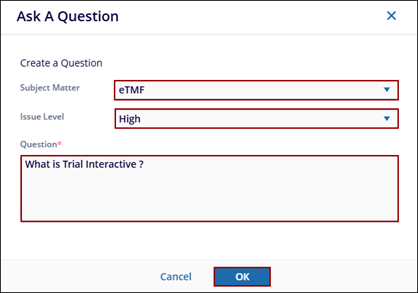
- On the Ask a Question window, specify the following details
- Subject Matter: Select a subject matter from the dropdown options.
- Issue Level: Select an issue level from the available dropdown option.
- Question: Mandatorily type a question in the text box.
- Click OK.
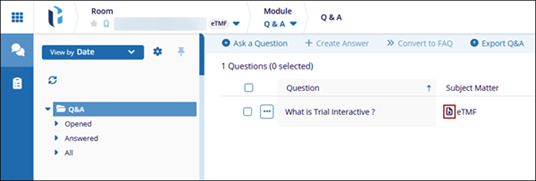
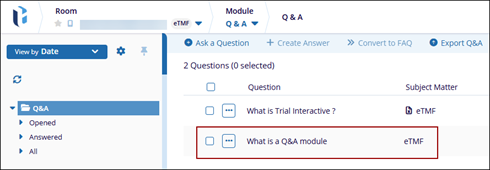
- The question is displayed within the Q&A tab with the document icon in the
Subject Matter field.
General Question
To create a general Question, follow the steps below:
- Navigate to the Q&A Module and select the Q&A tab.
- Click +Ask a Question from the top menu bar.
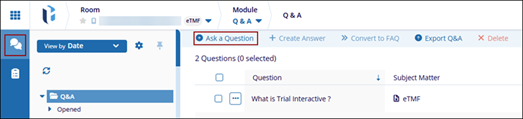
- On the Ask a Question window, specify the following details
- Subject Matter: Select a subject matter from the dropdown options.
- Issue Level: Select an issue level from the available dropdown option.
- Question: Mandatorily type a question in the text box.
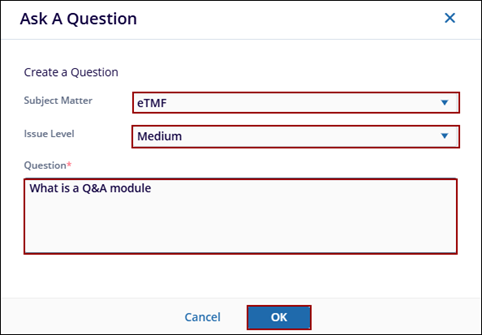
- The question is displayed in the Q&A list without the document icon.
Note: The fields displayed on the Ask a Question form are
determined by the Q&A settings configuration. Refer to the Q&A Settings section for
additional details.

 Linkedin
 X
X

