
Duplicate Audit
Explore Job Aids for more help:
Job Aids
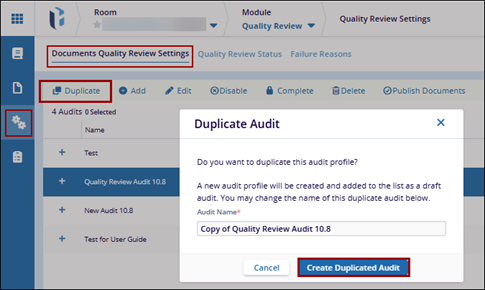
To create a clone of existing audits, follow the steps below:
- Navigate to the Quality Review module and open Quality Review Settings.
- Click on the Documents Quality Review Settings tab.
- Select an audit profile from the list.
- Click the Duplicate button from the top menu bar.
Note: Duplicating audits allows administrators to create clones of
existing audits with most of the settings already in place, thus saving time when
creating recurring audit profiles.
It may also help when an audit need replacing due to incorrect or obsolete settings.

 Linkedin
 X
X

