
Open Queries by Age
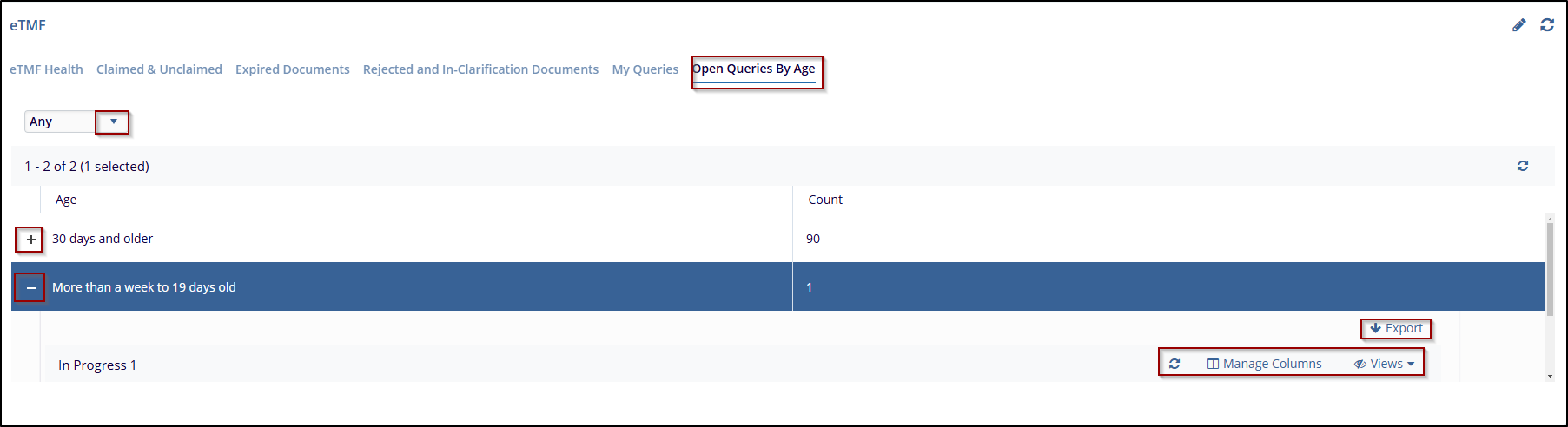
The Open Queries by Age tab displays documents that are older than 30 days or more. and provides a document count for easy tracking. The user can select a query type from the dropdown menu located at the top left, including Any, Workflow, or Audit options.
Follow the steps below to open queries by age:
- Click the Open Queries by Age tab.
- Use the Query Type dropdown to filter the queries:
-
Any – Displays queries from all available query types.
-
Workflow – Filters and displays queries related to workflow processes.
-
Audit – Shows queries associated with audit activities.
-
Start-Up – Displays queries related to study start-up activities.
-
General – Shows general queries that do not fall under specific categories.
-
- Click on the + sign next to the reason will expand the section, and reveal individual documents, including details such as the Submitted Name, Created Date, and Comments.
- Click on the – sign will minimize the section.
- Additional options, like Export and Manage Columns, allow the user to export the
data or customize the column view to focus on relevant information.

 Linkedin
 X
X

