
Reference Metadata
The standard set of TMF metadata is mappable from Trial Interactive document types but it hasn't been available directly in the User Interface. Providing this information allows for better metadata exports and improves classification.
For eTMF rooms, this metadata is now included with each document type in a set of virtual fields. Fields now include:
- Zone
- Section
- Artifact
- Sub-Artifact
- Index Number
- Description
- Instructions
These fields will simplify the full implementation of sub-artifacts, particularly important for the TMF Reference Model v3.2.
Additionally, when selecting a document type, the Instructions field is now made available as flyover help.
Finally, these fields are all fully reportable and are made available in standard views, grid view metadata exports, standard reports, and archives.
The Bulk Fields Update tab allows users to specifiy whether the field should be visible or required for all the sub-level document types associated with the parent document type. Refer to the instructions on bulk fields update detailed in the tab.

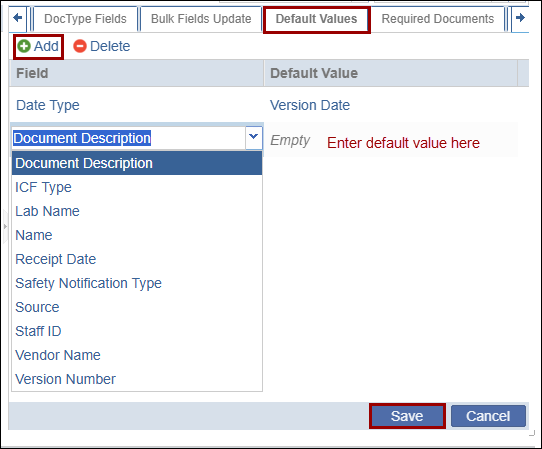
By implementing the Default Values options when defining a document type’s contour coding, users can set a specific metadata field value to auto-populate based on the document type.
To use these new options, you must first create a custom metadata field in Shape Settings. You must be sure to include the custom field in Coding before you keep the last changes.
- Click the Default Values tab.
- Click the Add button. The Field textbox activates.
- Click the dropdown arrow and select the necessary custom metadata field from the list.
- Set the field’s default value by typing the value in the textbox.
- Click on the Save button.
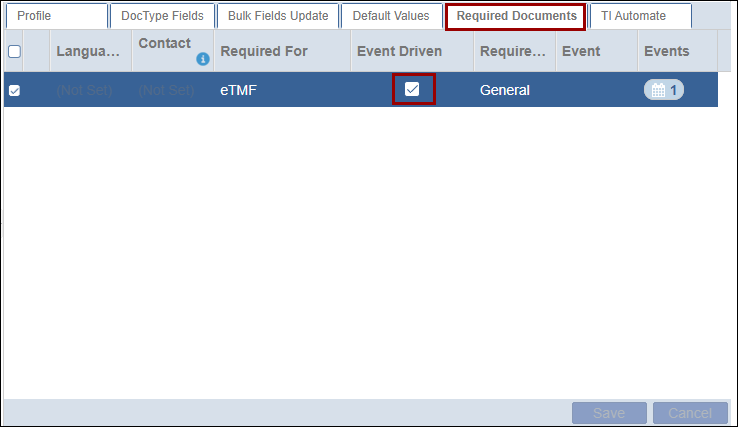
The Required Documents tab displays the document added to the Required Documents section. Users need to select the Event Driven checkbox.

 Linkedin
 X
X

