
FAQ Module Settings
The Frequently Asked Questions (FAQ) Module in Trial Interactive offers a centralized and easily accessible location for your study team to store commonly asked questions related to your clinical trial. This module can be readily accessed by anyone with permissions to the eTMF, Site, or Study Collaborate rooms, as well as standard Content Management workspaces.
Throughout a Clinical Trial, a wide range of questions arise from the team, such as document naming conventions, instructions on classifying metadata and content, contact information for specific study details, and critical entries for each Investigative Site. Providing your CRAs, CTAs, and Clinical Document Specialists with access to the right answers can significantly improve the efficiency of your project. Simply click on the FAQ Module to find the information you need.
How it Works
The FAQ icon in the Navigation Grid allows you to view the list of FAQs. You can reach this page by clicking the FAQ icon from the Navigation Grid. From this page, you may search for any FAQ, or simply view the listing and expand the answers you require. You can also view by date or category from the index, and also modify the columns, and create your own views as necessary. FAQs, both Questions and Answers, may contain rich text, images, and other information. Finally, FAQs may be emailed to other users in the room.
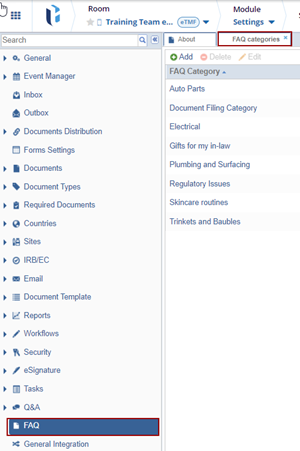
- Navigate to Navigation Grid -> Settings -> FAQ
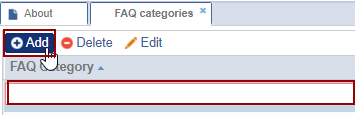
- Click Add. The FAQ Category field gets added to the grid.
- Click aside after making any changes to save it.
- Double-click the FAQ category or select an existing FAQ category and click Edit.
- Click aside after making any changes to save it.

- Select a FAQ and click Delete. The ‘Delete Item Confirmation’ pop-up window
is displayed.

- Click Yes if the user wants to delete the FAQ category.
- Click aside after making any changes to save it.


 Linkedin
 X
X

