
Integration
The Integration settings comprises of the following two sections.
- General Integration
- GlobalLink Portal Integration
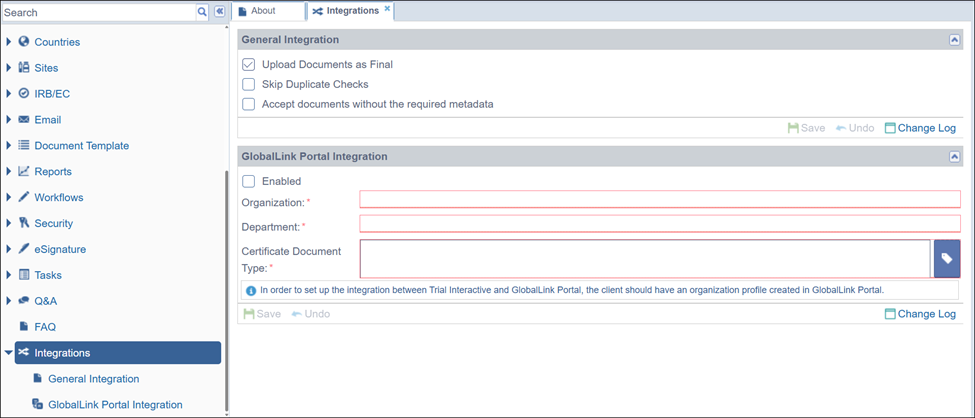
By default, all documents uploaded into the system are placed in a subfolder named after the user who uploaded the document. This subfolder is automatically created under the Upload folder, and the documents then proceed through the standard workflow process.
Through Integrations, clients can choose to bypass the workflow process for a document and upload it directly with a status of Final. To enable this, two criteria must be met:
- Assign a related folder for the document types of the documents to be uploaded
- Enable auto-indexing for the documents
Documents, upon being uploaded, would then move directly to the related folder assigned to their document types and acquire the status as final. Refer to the screenshot below:
- Navigate to the Navigation Grid->Settings--> General Integration.
- Tick the checkbox to Upload Documents as Final.
- Tick the checkbox to skip validation of the duplicated document name by enabling the Skip Duplicate Checks.
- Tick the checkbox to Accept documents without the required Metadata.
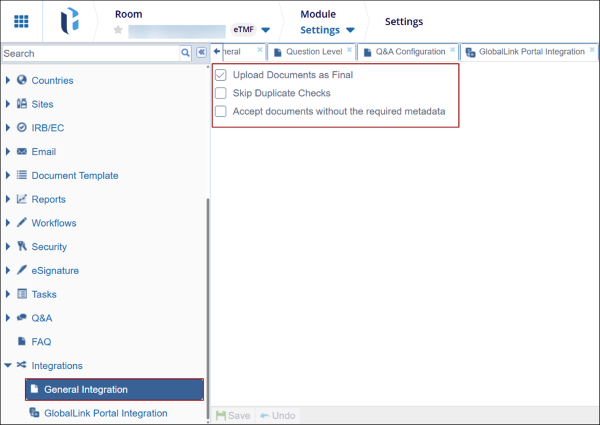
The Change Log option, located at the bottom right of the screen, displays a record of changes made to General Integration. It includes columns for Item Name, New Value, Old Value, Updated By, and Updated On (with the timestamp) and Close button.
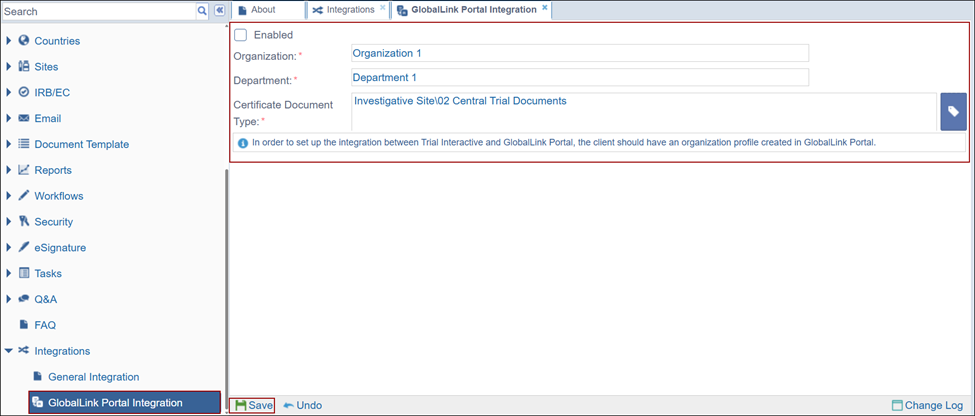
To configure the GlobalLink Portal Integration, perform the following.
- Check the Enabled checkbox
- Add the Organization and Department name.
- Click on the label icon and specify the certificate document type
- Click Save.

 Linkedin
 X
X

