
Required Documents
Administrators can set certain Document Types as Required/Essential Document Types to be collected, and a placeholder will be present to track the collection of required documents.
The Required Documents feature aims to streamline the management and tracking of necessary documentation within the eTMF system.
- Associate Required Documents with Responsible Departments
- Maintain Placeholders in eTMF Completeness View
- Set Default Document Type to Current Folder
- Deletion of Associated Placeholders on Contact Deletion
- Conversion of Required Documents to Placeholders
- Marking Missing Documents as 'Fulfilled Without Content'
To access the Required Document settings, follow the steps below:
- From the waffle menu (navigation grid) select the Settings module
- Select the Required Documents from the left-hand navigation pane.
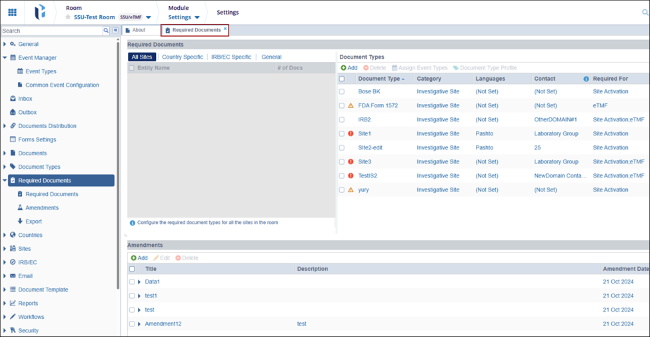
- Within Required Documents, administrators can configure the following setting
- Required Documents
- Amendments
- Export

 Linkedin
 X
X

