
Common Configuration
To access and configure the Common Configuration settings, follow the steps below.
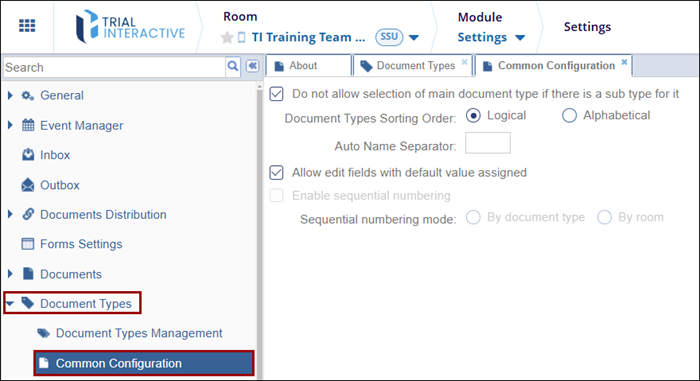
- Within the Settings module, click on the Document Types dropdown.
- Select the Common Configurations option.
-
Within the Common Configurations tab, configure the following settings.
Do not allow selection of main document type if there is a sub type for it: Enable this setting by clicking on the checkbox. If this setting is enabled, the selection of the main document will be restricted if a sub-type is associated with it.
Document Types Sorting Order: Select any one of the options by clicking on their radio buttons.
Logical: Selecting this option sort documents in order in which they were uploaded.
Alphabetical: Selecting this option sorts documents in alphabetical order.
Auto Name Seperator: Enter a character in the box provide which will act as a name separator or add a blank space as a separator.
Allow edit fields with default value assigned: Enable this setting by clicking on the checkbox. If this setting is enabled, some document metadata fields will be filled automatically on creating a document and selecting a document type from the configured list.
Enable Sequential Numbering: Click on the checkbox to enable the setting that activates the Sequential number mode options.
- By document type
By room
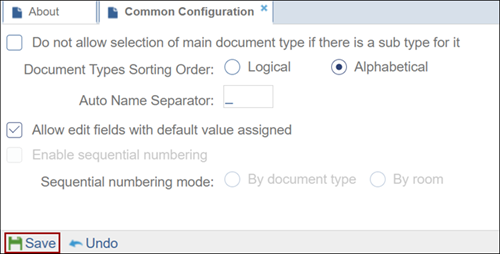
- Once all the changes are made, click on the Save button at the bottom of the screen.
- Once all the changes are made, click on the Save button at the bottom of the screen.

 Linkedin
 X
X

