
Common Settings
The Common Settings section allows administrators to configure key parameters such as default date ranges, timelines, email notification triggers, query reminders, and auto-claim settings.
To configure the common settings, specify the values into the respective fields or check/uncheck checkboxes of the following sections and click Save.
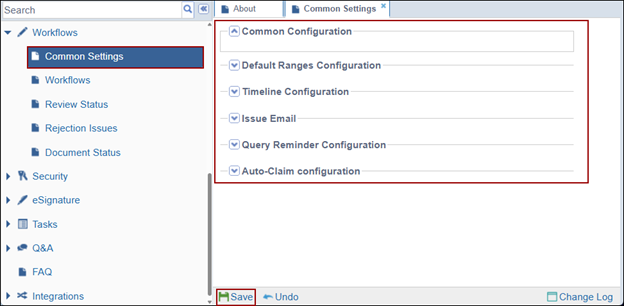
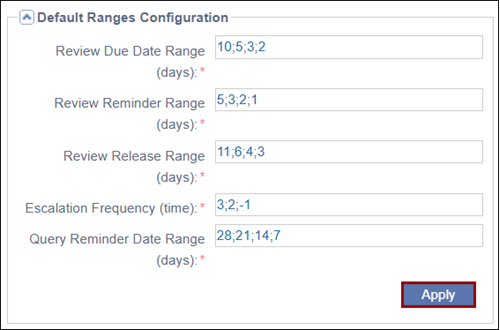
Default Ranges Configuration:
Within the Default Date Ranges section, administrators can specify a period in days or
time depending upon the field. To configure the default date ranges, enter the values
separated by a semi-colon into the following fields and click Apply.
- Review Due Date Range (days): Users can specify the days when the review would be due after claiming the documents for review.
- Review Reminder Range (days): User specifies the days before the due date when emails would be sent out to the reviewers reminding them of the pending review.
- Review Release Range (days): Users can specify the days after the claim when the documents would be automatically released from the reviewer’s claim list.
- Escalation Frequency (time): Users can define the escalation notification frequency time. Based on values specified, the notifications will be triggered to the respective users.
- Query Reminder Date Range (days): Users can specify the days when the reminder
emails shall be sent to the query recipients on the day as specified
here.
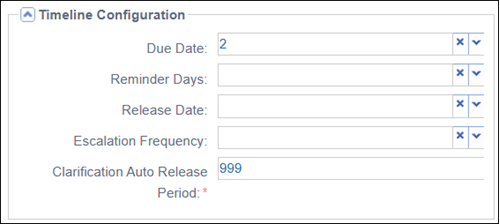
Timeline Configuration
In the Timeline Configuration section, select or enter the appropriate values from the to
populate each of the respective fields.
- Due Date
- Reminder Days
- Release Date:
- Escalation Frequency:
- Clarification Auto Release Period
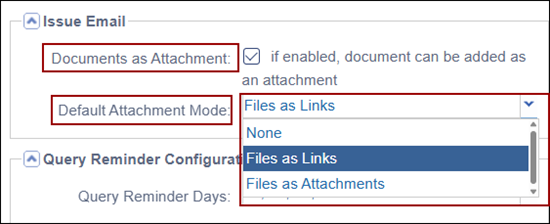
Issue Email
Within the Issue Email section, administrators can enable documents to be sent as
attachments with query emails in a workflow session and choose the default attachment
mode.
- Documents as Attachment: Check the checkbox to allow a document to be added as an attachment and vice versa.
- Default Attachment Mode: Select an option from the dropdown as the default
attachment mode.
Query Reminder Configuration
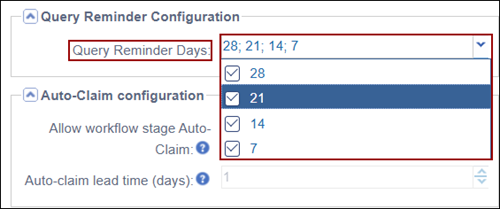
Administrators can configure a schedule by which reminder emails will be sent for a query that needs to be addressed.
To configure the reminder days, click on the Query Reminder Days dropdown and select on or multiple values.
Auto Claim Configuration
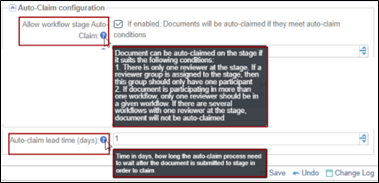
The Auto Claim Configuration settings allows administrators to configure whether a
document should be auto-claimed as well as specify the days when the document will be
auto claimed.
Note: If there are multiple users in a workflow
stage, any user authority must manually claim the document irrespective of the
Auto-Claim Configuration settings.
To configure the auto-claim settings, configure the following:
- Allow workflow stage Auto Claim: Check the checkbox next to the filed to enable document auto claim if the conditions are met.
- Auto-claim lead time (days): Enter the number of days in the field.

 Linkedin
 X
X

